Steps to Get Free iPod Touch Apps on Itunes Without Credit Card
New Update report from user Jayant Sharma: He has tried that using itunes 10 won’t work, Only could work with iTunes 9. Check next paragraph to read his steps:
Create iTunes Account Without Credit Card to get Free iPod Touch Apps – tips from Jayant Sharma
i can tell u all to download free apps……..
NOTE:- This works only in ITUNES 9…..
THIS REALLY WORKS!!!!! THOSE WHO DONT BELIEVE ME TRY IT!!!!
1. Download Itunes 9 (it doesnt work in 10 or any other).
2. Open it and then open Itunes store.
3. click on Sign In.
4. Then Click on create an account.
5. click on continue.
6. Fill the information correct (not fake)and fill ur gmail id.
7. click continue.
8. click on i agree the terms and conditions.
9.In credit card option click on none (none option is available in itunes 9 only).
10.Fill ur adress and phone no. correct.
11.click ok.
12.Go to ur gmail account, there will be a message sent by Apple.
13.Click on that message and click on the link given below.
14.This will confirm ur Id on Itunes Store.
15.Now go 2 Itunes store and Sign In.
16.Click on Search and find any free app. Some interesting apps are Talking Tom Cat,Angry Birds,Coin dozer etc.
17. Now click on FREE written under that app. and ur download will start. You Should download only free apps.
18.Put The Apps in Ur Iphone Or Ipad……….
Enjoy……………………………………………
THIS WORKS REALLY…..!!!!!
UPDATE:Here is the share from Victoria to get Free iTunes Account without credit card with “NONE” button.
“hey,
i had the same problem a lot of people are saying, where you cant see the “none” button. but i got mine to work finally!
this is what you do:
make a new email the you can use as your apple ID
go to itunes ( do it from your computer, it might not work from your ipod/iphone) and go to app store.
go to any free app (remote works) and try to download it. when that thing pops up press new account, and use the new email/fill out the rest.
when it goes to the billing page, you should see the none button!
it worked for me this way, so i hope it works for you guys!
hope i helped,
goodluck
Victoria
After so many people asking about how to get the free ipod touch apps from itunes, today I am going to share you the steps on how to do that. You no need any WiFi to do This. You need your iPhone or iPod Touch, Usb cable to connect your phone to computer. The latest iTunes 9.0.1.8 already installed in your computer / PC / Notebook.
Please follow these steps to get free iPod Touch Apps from iTunes: (You could read the Steps on how to create an iTunes Account without credit card in the Official Apple.com help site Here)
Update 27 December 2009: Many people have been reported that they don’t see the “NONE” option like the steps below. Might be this problem occur because the iTunes store not set up to US iTunes Store. These steps tested on US iTunes Store. So before you follow the steps below, please set your itunes store to US. To do that go to the very bottom of the iTunes Store page and select US from there. See the screen shots below:
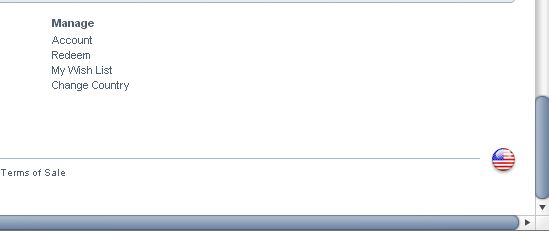
Click the Flag to Choose the store (my iTunes has been set up to Us, so the Flag is US Flag).
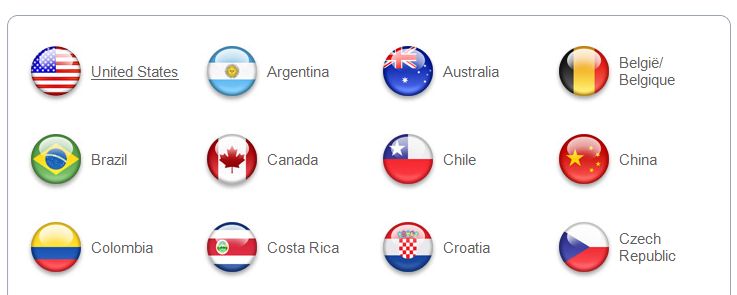
Choose US Flag from the Choice above.
Then follow the Steps Below. I hope now all people could see the “NONE” option.
1. Please connect your iPod Touch or iPhone using USB cable to your computer.
2. iTunes which already installed in your PC should be pop out automatically, if not, then please open the itunes manually. This process is called iPod Touch Syncing.
3. Go to iTunes page, and please choose >> iTunes Stores.
4. In the Top right Page you will found a Search Box there. Just Type: Free Apps
And Click Enter.
5. You will see many choice of apps there, some are paid iPod Touch Apps, but many of them are Free. Just choose the Free Apps.
6. Click the Free Apps that you want and you will delivered to the individual page of that app. Scroll down the page and see at The Bottom Right, see the Requirement there. You will get the info what is the minimum requirement of your iPod Touch and iPhone OS.
7. If All Okay, Click the “Get App”. And the new window will be pop up. You will asking to enter your Apple Id to sign in Itunes. if you do not have yet, then Choose the “Create New Account” button there. And follow all the instruction to create itunes account there.
Big Note 1: For now, Only US people with US Address who could create the account.
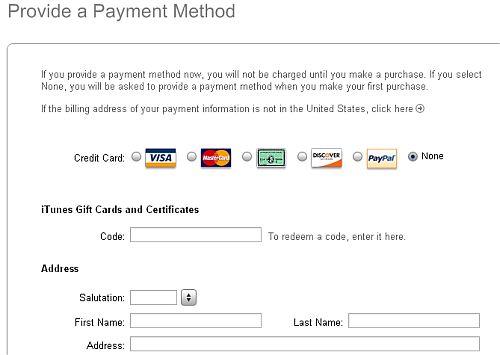
Big Note 2: When creating new account, Itunes will asking you to enter payment option, like Credit Card or Paypal. Bur there is one best Option if you do not have any credit card or paypal, the Option is “NONE”. If you choose “NONE” option for payment, then you only could download Free iPhone Apps.
For you that mis the word: NONE, please see the screen shot image below, the word is placed at the right of the credit card and other payment processors:

8. After you get the account details and you could sign in to the iTunes Stores, then the free Apps will be downloaded automatically to your iPhone and iPod Touch.
9. Last step is go to your iPod Touch and iPhone and check your free iPod touch App that you want.
There are thousands Free ipod Touch Apps in Itunes Stores, just pick the app and follow all steps above to get the apps. Please read the review about Popular ipod Touch/iPhone Apps and iPhone Games Apps in following sites:
1. TouchGeek.Com
2. TopiTouchGames.Com
3. TopiTouchApps.Com
4. iPodPortal.Com
Best Free iTunes / Iphone Offers:
Please note that this method to create free itunes account without credit card is work for most people especially from USA, German, Spanish, and many other big countries, And if you found that you could not use the method and do not see the “NONE” button, might be iTunes do not allow your country to create Free itunes account without entering Credit card details.
And if You have another Tips and more simply steps to get free ipod touch apps, Please kindly share it to us by dropping a comment below
Check Out These Too:
- Where to Get Free iPod Touch Ebooks? free ebooks for ipod touch The technology is growing so fast nowadays. Several years ago, people still like to go to the library or book store then borrow or buy…
- How to Sync Apps to iPod Touch? One great way to relieve stress and boredom is iPod touch. With the iPod touch we can listen to different kinds of music as long as we want to. Likewise,…
- What to Do When iPod Touch Apps Close Automatically Recently, Mike wrote into us and told us about a problem he was havingwith his iPod Touch apps. After doing a little digging, I found this is common problem among…
- YourCards for the iPod Touch Why spend all that time searching through the thousands, if not millions, of e-card sites on the Internet to find that perfect holiday or special event card? Now you can…
- Restricting the iPhone? Sad, but sometimes, necessary Why would you ever want to place restrictions on your iPhone or iPod Touch? Well, you may not want to, but if you're a parent and have just bought the…
- Easy methods to solve Ipod touch applications not… If your iPod application won't work- this method is for you! Apple Ipod Touch Devices supported a huge group of application and games. All users can have the application by…
- How to Protect Apple Id? Tips to protect Apple Id by AppleRepo.com - It's still an incredible number using simple number combinations, surname or personal number to log on to your apple id services. This…
- Create a Awesome Lock Screen app for iPod Touch Forget the poor use of English (the name of the app should be 'Create An Awesome Lock Screen', the Create a Awesome Lock Screen app for the iPod Touch is…
- Having An Ipad And Iphone Stuck On Waiting While… It really annoying when you try to download iOS apps for your iphone or ipad and you got a jam that delays the installation process. Having a bad day just…
- How Does Free iTunes Code Works? How Does Free iTunes Code Works?. iTunes, one of the biggest media player and download station in the Internet, has come up with a promo that they give to online…
- Cube Runner for the iPod Touch Yay! Another game for the iPod Touch that is not only beautifully simple in design and concept, but also totally addicting and yet another great time waster. This game has…
- Free iTunes Codes - Is It for Real? Free iTunes Codes 2011. Who doesn’t want free stuff? Everybody does. If you want to download legal music and videos, you can do so buy going to iTunes. Each song…
- How To Fix Apps That Won't Open (iPod Touch / iPhone / iPad) Have you ever experienced apps being unable to open? This usually happens whenever there a new iOS update; and since the iOS 6 is almost here, it’s better to get…
- Get FREE $50 Gift Card from Toys R Us When you Buy… Get FREE $50 Gift Card from Toys R Us When you Buy Any iPod Touch We want to say Happy Thanksgiving for you All! Today we got an email from…
- Where to Get Valid Free iTunes Gift Card Codes? Where to Get Valid Free iTunes Gift Card Codes?. AppleRepo.com, There are many websites that do offer free iTunes Gift card Codes, but unfortunately, some of them may have expired…
- How to Delete Photos from Your iPod Touch We've covered the topics of adding pictures to your iPod Touch, and recovering deleted photos from your iPod Touch, but how can you simply delete photos from your iPod Touch?…
- Bald Booth! for iPod Touch Once in awhile an app comes around that lets you play around with pictures of yourself or lets you try out new looks on yourself. Generally these apps are a…
- The Three Best Shopping Apps for the iPod Touch The iPod Touch is great for doing all kinds of stuff. But did you know that you can shop directly from your Touch, without ever opening the browser? All you…
- HowStuffWorks for the iPod Touch Millions of people every day log onto the How Stuff Works website to find answers to their common questions and well, just find out how something works. When you don't…
- How to Get a Free iTunes Gift Card iTunes gift cards are some of the greatest little things on Earth. They allow you to buy all of your favorite songs, videos, and iPhone apps - all without using…
- Appoday - Free App Deal of the Day from iTunes Apps Store Appoday is an app for the ipad, iPhone and iPod Touch devices that works on a similar system to the Groupon website. The idea of the application is that it…
- Pac-Man Lite for the iPod Touch If you want to play the classic game of Pac-Man on your iPod Touch, but don't want to shell out the hefty $7.99 price (sheesh! Who could blame you?) then…
- Free iPod Touch Apps for Gaming; Angry Birds Rio Free iPod Touch Apps for Gaming. Angry Birds has to be one of the most successful mobile applications that has ever been launched in the history of the world and…
- How to Get Free Movies on your iPod Touch Sure you can download free movie apps and even free video for your iPod Touch. But, how do you get free movies for it? There are actually many ways to…
- What to Do When Your iPod Touch is Frozen? Sometimes, users of the iPod Touch often find that their iPod Touch screen has become frozen and will only display a particular image or icon. Nothing seems to work because…
- Where to Get Free iTunes Codes? Where to Get Free iTunes Codes. If you are a big fan of music, you are probably addicted to iTunes. It is by far the most popular digital media player…
- Jailbreak iPod Touch with 2.0 Update Jailbreak iPod Touch. iPod are initially locked at the time of purchase and either they need to be registered or it needs to be unlocked. Unlocking of iPod with any…
- Free iPod Touch Apps for Radio; TuneIn With the iPod Touch and the iPhone having Wi-Fi connectivity, there are a range of services that you can have access to and one of them is of course the…
- Need Help Getting Your iPod Apps to Work? There's a common problem among iPod Touch users and the apps that they want to use on their iPod. Of course, the apps are the best part, so we definitely…
- How to get an application for iPod touch without iTunes An application for your iPod touch without iTunes is already here! Have the complete potential of your iPod Touch and bid farewell to iTunes software. And have your iPod touch…

Or you could just refer to this simple guide by Apple themselves –
http://support.apple.com/kb/ht2534
The minute you try to launch itunes 9.0, quick time, which downloads with itunes, is not compatible with itunes 9.0. Complete waste of time. Buy an itunes gift card.
ummm. i’ve already downloaded itunes 9 but sill there’s no “None” button. please make me an account 🙁
please can you tell me why it dosen’t work with the i tunes10
i didn’t find my country on the list of the countries so what am i do please help me thanks
There’s None option. what should i do. contact me plz
Ok, I really tried very very hard and it didn’t work. Can anybody help me?. -to take into account: I created a new gmail account to use it as my apple id, and I erased iTunes 10 to install iTunes 9.
The “none” option is definitely NOT there. I’m very upset, angry with apple (they are so greedy!), etc. This is not fair.
i did all the step above and i start downloading many free applications but when i wanted to connect my iphone 4 to itunes 9, it said that it required version 10.1 or later. so how can i sync the applications into my iphone 4. pls help
I managed to download Free apps from Itunes 10 without using credit card. I’ve been doing this since last year.
i don’t find any none option on the itunes 10
please help
#han,
another user here tell us that it could work if you use iTunes 9 not iTunes 10
could u please help me out some way..
help!! i downloaded the itunes 9 as it said (laptop). i did as the steps asked me to.. everything was fine till it came to the payment page , there i couldn’t find the ‘none’ button. please help me asap. thanks. 🙂
I also cant download there is also no Option None.I am from Korea.I need to download free apps.Plz help me……
i do have apple ID but it doesn’t work to download
Plz Do mail me appl id thanks
i am using itunes 9.0.2.25 bu there is no none option in itunes so how shoud i make my id in itunes
Thank you!!!! Super helpful!
thank u it worked out
i can tell u all to download free apps……..
NOTE:- This works only in ITUNES 9…..
THIS REALLY WORKS!!!!! THOSE WHO DONT BELIEVE ME TRY IT!!!!
1. Download Itunes 9 (it doesnt work in 10 or any other).
2. Open it and then open Itunes store.
3. click on Sign In.
4. Then Click on create an account.
5. click on continue.
6. Fill the information correct (not fake)and fill ur gmail id.
7. click continue.
8. click on i agree the terms and conditions.
9.In credit card option click on none (none option is available in itunes 9 only).
10.Fill ur adress and phone no. correct.
11.click ok.
12.Go to ur gmail account, there will be a message sent by Apple.
13.Click on that message and click on the link given below.
14.This will confirm ur Id on Itunes Store.
15.Now go 2 Itunes store and Sign In.
16.Click on Search and find any free app. Some interesting apps are Talking Tom Cat,Angry Birds,Coin dozer etc.
17. Now click on FREE written under that app. and ur download will start. You Should download only free apps.
18.Put The Apps in Ur Iphone Or Ipad……….
Enjoy……………………………………………
THIS WORKS REALLY…..!!!!!
I am from India and searched a lot for these apps…….
THOSE WHO DON’T BELIEVE ME TRY IT !!!!!!!
ALL VIDEOS ON YOUTUBE ARE FAKE…………..
PLEASE FORWARD THIS COMMENT TO OTHER SITES AND HELP EVERYONE……..
THANK YOU……
let me get free apps
I want free apps
There is really no none, on the itune credit card.
so i agree with the other don’t say thing when there really isn’t
there. Its lame.
my itunes doesnt have the NONE option??? wat do i doo?
If only it were that simple, oit seems i can’t get it to work on my daughter ipod touch. I am very tech savy and followed the above directions over a dozen times, but when I get to the screen that asks for credit card information there is not a “none” option. The options end with Pay Pal, this is becoming very fustrating to my teenage daughter who wants to be able to download free apps. I will not under any circumstances giver her access to my credit card data. I have already downloaded the latest version of itunes and made sure all updates were installed. i also tried to delete cookies and temp internet files.
Does anyone else know how I can correct this problem???
#Larry
I do not know why “None” option is displayed in many people then not displayed on many other people. The Steps are described very clear. have you try to use the tips from Victoria (check latest Update on this article above). Try to sign up using laptop/Pc not your Phone/touch. and use very New created email address. If it still failed, then Please contact me. And send me your Full Address, And your new created email along with login details. I’ll try to Sign up using your details from here. and if it successful, I will send you again the email and password, and you could change the email password and use the account again. regards, applerepo.com
will u get in trouble by apple for making fake details like ur street and stuff
Hey Thanks 4 the tip, I got it already on my itouch. thanks 4 your help.
it works now its just that wont you get sued if you make fake details
HELPP!!! i think they dont have the none icon anymore because all i see is visa,mastercard,discover,paypal and this other credit card they have in united states i need help ASAP because my parents wont let me use the information.
#Sheila,
Have you try the tips from Victoria? Use Computer or Laptop (not your iPhone/iPod Touch) with latest iTunes Installed, and register using new email address.
Take that back it does
It doesn’t work
How can I get free games?
if you have already clicked on another credit card option the none button will go away for good so you have to create another account but you cant use any of the same information from the previous account once youve made a brand new account it should work , anymore questions?
guys i have found the solution all u gotta do is make new email like she said (i didnt do it till now cause i thought it was lie no offense) but really like make new email and wen u get to billing page…..the none buttom will be right there i didnt see it at first but then i made new email and waaaallllaaa it jsut popped their so i hope this helps JUST FOLLOW WHAT VICTORIA SAID!
#Victoria
Thanks for your great share. I hope it could help others who do not see “None” button when try this method.
ummm i cant find the none option its no there! i need help! plz T^T
hey,
i had the same problem a lot of people are saying, where you cant see the “none” button. but i got mine to work finally!
this is what you do:
make a new email the you can use as your apple ID
go to itunes ( do it from your computer, it might not work from your ipod) and go to app store.
go to any free app (remote works) and try to download it. when that thing pops up press new account, and use the new email/fill out the rest.
when it goes to the billing page, you should see the none button!
it worked for me this way, so i hope it works for you guys!
hope i helped, goodluck 🙂
It didn’t work at all I tried six time. could there be another way!!!!!!!!!!!!!!!!!!!
Does iTunes mail me when I put in my adress to sign up for iTunes
Try Entering Incorrect CC Number then None Will Show Up
ok dina and simqueen, when you go to the itunes store go to the bottom and select country, then select us, then select one free app and it will ask you to create the account, go through the process and when you reach the billingmethod you should be able to see the none icon. i did exactly that and it worked hope i helped
You can set up an account without a billing method, but when I try to download a free app, it requires one. I’m gonna try it thru the computer instead of the iPod touch. I will let you know what happens after that
Hi umm..i dont see that None button?!
nothing to do so i need to downoled some
Im regards to the “None” option.. well there is.. “none”
PLZ HELP ME TO CREAT A FREE LATEST ITUNES ACCOUNT
This is very interesting, as I would have always expected iTunes to shore up any glitches they might have in all things retail and web, including their credit card processing services. That being said, I don’t feel as though this is a hack, but rather just a way to get around what we in the internet age have come to assume is nothing but standard. We shouldn’t forget that we can get around just throwing our personal information out there for every corporation to see, that we actually can still keep things private.
thanks a lot…
Hi,
There is no NONE botton…
What can we do ??
Pl advise
there is no none button,
THANK YOU SO MUCH!! my son deleted tons of apps and my bank account is no longer active and i been trying to figure out how to do it!!! thank you thank you thank you!
How to sign up in kosovo country help mi PLEASEee ?
create a new account. it works.
if it doesn’t work the first time, then start the create an account process all over, and the second or third time, it should work
KEEP THIS COMMENT ALIVE
i want paid games without cash can i download that
Hey, please help me!! I Cant verivy my email, what was that? Pls tell& help me asap! Thankyou very much
ive done this so many times, but there is just NO “none” option! there are 5 payements options, and the “none” thats supposed to be next to paypal is just not there
Hey here’s what you can do
1. Go to Itunes
2. Look up iBooks, or any free app
3. Free APP
4. Click create new account
5. go through the instructions until it gets to payment info
6. Click none
7. Finish the account creation
You can try it from your Ipod of iphone… I think it will appear… It apeared to me..
there is no none option on the right side. i tried so many times, and a friend who has done this successfully last week also tried to help, but nothing worked. i can not download free apps without a credit card number.
any othere suggestions?
well… there is no none option in my itunes…..
I think it’s related to the countery I’m signing up from…
Could anyone please make me an account???
I will be thankful for you…:)
it is actually working..I was able to sign up an account with Itunes but I also dont have my card number. You just need to look for the ‘none’ option I think at the bottom and you’re good to go. I just created my account yesterday.
u say to go to the itunes store and sign up and click on none well the is no none button come on dont say stuff if its not there and if it was taken off should have that u better help me
It worked for me today. Its the last dot on the right next to the CC`s.
I’m fairly certain that they stopped allowing the “None” option…
i can’t see the none choice in the payment method. Does it depend on the country where you are located? help!!!!!!!!!!!!!!!!1
thanks this helped alot—loolz i before only went where it says free apps but if u SEARCH FREE apps u get lot more
i tried that, but i cant see the none button.. can anyone help me?? i really need an iTunes account…:D
it has a none option right next to paypal i used it and it worked for me and i am now able to get the free iphone apps. i actually signed up via itunes on my computer too.
Thank you soo much! i was wondering why they were asking me for credit card info when i was getting a free app…
oh btw i had some itunes credit, so i think thats why they let me have the none option… just a suggestion
how can it be possible to view the NONE option there?? even i select as S?
please help!
i can’t see the NONE option when filling out the billing information.
only credit card and paypal is visible.
how can it be possible to view the NONE option there??
Help, I cant register in apple when I try to choose the none option. tnx
@isha
you can create it from your app store application on your ipod touch 3g
yes, without credit card. just choose none.
hope it helps. 🙂
I need to put some games in my ipod touch 3rd generation but the only way (i think its the only way…) is to make an account on aps store but to make an account we need to put the credit card number but i dont have a credit card anymore.. so is there any other way??????
PLZ HELPPP MEEEEEEEE 🙁
cool but i cant get it its says i need to put a credit billing info if not then i dont have an account!!!!!!!!!!!!! 🙁
@Evana
If you have followed all steps above and still can’t see “None” option, then might be the steps are not working for you. And I cannot explain what’s the problem there.
Heeeey I still cannot see the “none” on my iPod and I’ve been trying and trying but it still doesn’t work ! 🙁 I’ve also been using one of my friend’s account since I got my touch because I cannot make my own without entering the credit card number!! I would really appreciate your help.
On the payment method.. it has the credit cards & then it says “NONE”… Thats what i ment
I tried also and it didn’t work for me. Thing is I am waiting to get my new credit card next week but in the meantime I am stuck with a brand new plain old iPhone with no apps (frustrating). Apple if you read this please reconsider your strategy/discrimination with apps. If I could try them out free I would be more likely to buy one. Anyway thanks guy for trying to help us.
OMgahhdddd!! YAY! I FINNALLYYY HAVE GAMES ON MY IPHONE!!!!!!!!!!!!! xD im so happy xD
YOUR A LIFESAVER MATE. THANKYOUUUUUUU 🙂
i still didnt see the none option after changing the itunes store to US.
to Jay,
the best option is use Paypal. I heard you could create Paypal using VCC. use the steps above to get Free ipod Touch Apps only, not the paid one
I am from Canada and own a Ipod touch. I bought a $15 itune card cause I dont have a credit card. I can get movies and songs but Not games and Apps. Why? Would it work If I bought a PRE-PAID credit card.
thaanks budy thats also workin in india thanks again
My Aunt from Canada gave me an ipod touch, too bad, when I am about to register to itunes, I can’t see options ”None”. I’ve tried to re install the software several times but still no luck. Can somebody HELP me . . . Please . . .
if i nt stay in us can i still download?it seem that the term n condition change already
if there is a “none” option try to reinstall the itunes on your computer.
i did everything too, and there is no “none” option there…please help…
eumm I did everything and i still cannot see the NONE on my touch …can you please help me ?
i think this is not applicable in itunes store today!!!
U just did it but, just as Stacy said, the famous NONE doesn´t appear, I don´t know if we must have the itunes version you said, ´cause I think I´ve got the newest and it´s not the one you stated there….but I´m not sure about it….but the “NONE” it´s not there…..
when i did it it never had a none option?
On the back of the card it doesn’t say anything about not being aloud to buy apps……. cause if i would have known that, i wouldn’t have gotten the card.
It works in canada too!!!!!!!!!!!!!!!!!!!!!!!!!!!!1
Wow, it works! Thank you so much!!
If you’re not from the US, the iTunes card is only good for downloading music. I ran into the same thing(I live in Canada), but bought $60 in iTunes cards. The fine print on the card also explains limitations.
Ok, But why can’t i buy apps? I have 15 dollars on my account but it wont let me buy any apps..
@Tegan,
The None button work for Free iPhone Apps only, not for Paid Apps version. You need to pay for Paid Apps
by the way im not from US
I bought a 15 dollar itunes card and activated it and everything, It says i have 15 dollars on my account, But when i click “buy app” it says enter my password, so i do, then it goes to the pay method and i clicked none cause i’m not use a credit card when i have 15 dollars on there already, but clicking none doesn’t work either.. How can i get it to work??
hey folks,
nice forum..
i have not bought an ipod yet, but was curious about itunes and applications; have done all these things even before reading ur column ^_^
I’m not from US but i have created this apple account and also downloaded some applications in my pc.
Just wanna ask you, how these applications will be installed in ipod/iphone ?
All steps have been posted above, just read, and reread again for sure. and you will Get tens of free iTouch apps in iTunes store. please note, you won’t get Paid Apps for free, but get only iPod touch apps which labeled “free” there.
WHERE IS THAT NONE BUTTON??
Kindly be sure of what you say ok.Do u mean by doing this so,i will be able to get even the full version applications and games for entirely free????
thanks for all …. cheers man
sorry not first name but last name it is said on the the up of the last name required
to get an adress in usa follow this link http://www.anywho.com jus type a first name like Smith and enter the state you will find all information about the people live in USA
@yesh
Sure, it could work for iPod touch and iPhone too.
can we also download free games for ipod touch pls tell me
i dont know how to install it plz tell me how to install i am using firmware 1.1.5 plz reply
Julio, try to restart your ipod touch after you download the apps from itunes store. and go to the app after that.
i do all the steps you said, but i dont know how to run, move or install the epplications in this case the game
yay it worked 🙂 🙂 🙂 🙂 🙂
I can’t find any free apps. Can you help me to get some or give me a website?
#Stacy,
Are you sure? That screen shot made up few days ago using the latest iTunes (V. 9.02). And I still see the “None” option here. I do not know why it not displayed on your side. Will try to find this answer. Thanks for the information. Actually Apple.com has the full steps here:
http://support.apple.com/kb/HT2534
Please check it out.
And choose US for your iTunes Store. two screen shots have been added above.
it appears Apple/iTunes has removed the “none” option. your screenshot is out of date… I am having the same issue..
Dear Stacey, I have upload the screen shot to show you where is the None word is placed.
rgd
AppleRepo
there is no none button
Kristi, that’s because Apple is discriminating customers outside the US.
yeah. so when i did this there is no “NONE” option. why is that?
I’m not from US and only US Citizen can get free apps from there??? So please now what should i do???
Apart all of this i m using Ipod touch 8Gb and want to upgrade my ipod..can i upgrade this free??If yes then how?
#IVan,
there is a trick for that, but please note I do not recommend that here. Use with your Own Risk :).
The trick is when you do the registering process, you could fill the address with US Address. to Get the US Address, go to Google Maps and pick a random address in the US.
Thanks
Applerepo.Com
I just bought an itouch and I am not being able to have an apple ID without credit card…your tips are good but since I am not a US citizen it does niot work for me…Do you have some tips to help me???
Hi Yacky, I’m Glad to know that the tips work for you 🙂
thank you so much. it works! i don’t have any credit card to have an account so i am so worried about it, but through this information i can now use my itune for my ipod. thank you very much