
Download Zelle App for iPhone: Your Complete Guide to Setup, Banks, and Instant Transfers
The landscape of digital payments transformed dramatically when Zelle emerged as the banking industry’s answer to peer-to-peer payment apps like Venmo and Cash App, but understanding how to download Zelle app for iPhone in 2026 requires navigating significant changes that reshaped Zelle’s availability and accessibility throughout 2025—most notably the discontinuation of the standalone Zelle mobile app that previously allowed users to send money without accessing banking apps directly. As of March 31, 2025, the independent Zelle app ceased supporting new transactions, with enrollment cutoffs beginning even earlier on January 8, 2025, fundamentally shifting Zelle from a standalone payment solution into a bank-integrated service accessible exclusively through participating financial institutions’ mobile banking applications. This strategic pivot reflects the banking industry’s push toward consolidating financial services within their own ecosystems while maintaining Zelle’s core promise: instant, fee-free money transfers between US bank accounts that settle in minutes rather than the days required by traditional ACH transfers or wire services charging substantial fees.
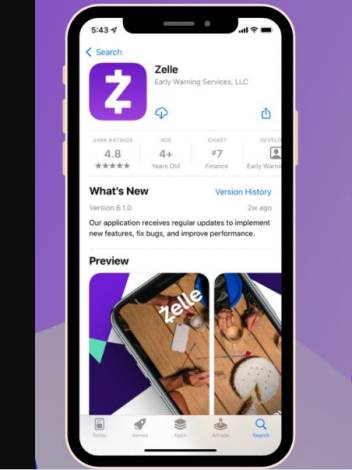
Whether you’re wondering how do I get Zelle on my iPhone for splitting restaurant bills with friends, paying rent to landlords preferring instant digital payments over checks, sending money to family members across the country, or simply keeping pace with the cashless payment revolution, this comprehensive guide examines every aspect of Zelle on iPhone—from clarifying which countries is Zelle available in (spoiler: only the United States) through explaining which banks use Zelle among the 2,100+ participating financial institutions, from addressing the confusion around is Zelle not in the Apple App Store given recent changes through exploring the Zelle to PayPal transfer question frequently searched by users trying to move money between incompatible payment platforms. The transition away from standalone Zelle app creates particular confusion for new users attempting downloads who encounter restricted enrollment or existing users uncertain about their service continuity, while the download Zelle app APK searches reveal fundamental misunderstanding about iOS architecture where APK files (Android Package format) don’t apply to iPhones requiring App Store installations exclusively. Understanding these changes, requirements, and alternatives empowers iPhone users to harness Zelle’s instant payment capabilities through proper channels while avoiding scams, fake apps, and unnecessary frustration from outdated information proliferating across internet searches and social media.
Understanding Zelle: The Bank-Owned Payment Network
What is Zelle and How It Works
Zelle represents a peer-to-peer payment network owned and operated by Early Warning Services, LLC—a financial services company owned by seven major US banks including Bank of America, BB&T (now Truist), Capital One, JPMorgan Chase, PNC Bank, U.S. Bank, and Wells Fargo. The service launched in June 2017 as rebranding and consolidation of earlier bank-owned P2P payment efforts including clearXchange, creating unified platform enabling instant money transfers between bank accounts registered with email addresses or US mobile phone numbers. The fundamental architecture connects directly to participating banks’ core banking systems rather than operating as intermediary holding user funds like Venmo or PayPal, enabling money to move directly from sender’s bank account to recipient’s bank account in real-time using established banking infrastructure and rails.
The user experience centers on simplicity: enrolled Zelle users send money by entering recipient’s email address or US phone number, specifying dollar amount, confirming transaction, and watching funds disappear from their account while simultaneously appearing in recipient’s account typically within minutes—often instantaneously if both parties use Zelle-participating banks. Recipients enrolled in Zelle with the email or phone number used receive automatic deposits without claiming payments or providing additional information, while first-time recipients receive notification prompting them to enroll through their bank or the standalone app (when it was available) to claim waiting payments. The speed advantage over traditional payment methods proves compelling: ACH transfers require 1-3 business days, wire transfers cost $15-35, checks take days to mail and clear, while Zelle typically completes within minutes at zero cost to users.
The competitive positioning versus Venmo, Cash App, and PayPal highlights strategic differences. Zelle emphasizes security through bank integration and regulatory oversight that mobile-first payment apps can’t match, eliminates fees that platforms charging for instant transfers or credit card funding impose, maintains traditional banking privacy without social feeds broadcasting transaction details, and processes payments instantly rather than requiring manual withdrawal to bank accounts. However, Zelle sacrifices features like buyer/seller protection that PayPal offers for commerce transactions, social interaction elements making Venmo popular among younger users, investment capabilities Cash App provides, and international transfer options that PayPal and others support—positioning Zelle specifically for trusted person-to-person domestic payments rather than broader payment ecosystem ambitions.
Critical Changes: The Standalone Zelle App Discontinuation
The announcement in late 2024 that Zelle would discontinue its standalone mobile application shocked many users who relied on the independent app rather than accessing Zelle through banking apps. The phased shutdown implemented strict timeline: beginning January 8, 2025, new users could no longer enroll through the standalone Zelle app though existing enrolled users maintained access temporarily, while March 31, 2025 marked complete cessation of standalone app functionality with all transactions requiring bank app access afterward. This transition forced standalone app users to either enroll Zelle through their bank’s mobile application if their financial institution participated in Zelle network, or lose Zelle access entirely if their bank didn’t support the service.
The strategic reasoning behind discontinuation reflects several industry trends and business considerations. The vast majority of Zelle volume already flowed through bank-integrated access points rather than standalone app, with major banks promoting Zelle within their mobile banking apps as feature differentiator attracting customers and increasing engagement with banking platforms. The security advantages of bank-integrated Zelle proved superior to standalone app where users linked external debit cards creating additional fraud vectors and authentication challenges. The operational costs of maintaining separate consumer-facing standalone app alongside bank-integration technology duplicated efforts that consolidation into bank channels eliminated. Perhaps most significantly, the banking industry wanted to ensure users remained within banking app ecosystems where banks could cross-sell additional products, build deeper relationships, and maintain platform control rather than directing users to standalone apps owned by bank consortium but operated separately.
The practical impact varies dramatically based on user circumstances. Customers of Zelle-participating banks faced minimal disruption—they simply accessed Zelle through their existing banking app using identical functionality to standalone app plus enhanced integration with account balances, transaction history, and banking features. However, users whose banks didn’t participate in Zelle network found themselves completely cut off from Zelle ecosystem after March 31, 2025, forcing migration to alternative payment platforms or pressure on banks to join Zelle network. The transition created particular challenges for users who managed multiple bank accounts and preferred centralized Zelle access rather than tracking which banking app contained Zelle functionality, though this proved minor inconvenience compared to total service loss for non-participating bank customers.
Which Countries is Zelle Available In? Geographic Limitations
US-Only Availability and Why
Which countries is Zelle available in? Zelle operates exclusively within the United States with no international availability or plans for global expansion. This geographic restriction stems from fundamental architectural design: Zelle integrates with US banking infrastructure, operates under US financial regulations, requires US bank accounts for sending and receiving money, mandates US mobile phone numbers for enrollment and verification, and builds upon domestic payment rails incompatible with international banking systems. Users attempting to access Zelle from outside the United States encounter blocked functionality even if they maintain US bank accounts and phone numbers, with geolocation detection preventing app access and transactions from international IP addresses.
The technical requirements enforcing US-only operation include mandatory US bank account linked for sending money (no exceptions for international banks regardless of USD denomination), US mobile phone number or US-based email address for enrollment and recipient identification, US physical address associated with bank account and Zelle profile, and device location within United States during transaction attempts with GPS verification preventing VPN circumvention. These restrictions mean US citizens living abroad cannot send or receive Zelle payments despite maintaining US bank accounts and phone numbers, international students in US with foreign bank accounts cannot use Zelle even if they obtain US phone numbers, and travelers outside US temporarily lose Zelle access until returning to American soil.
The strategic business reasons for geographic limitation involve regulatory complexity across different countries each imposing unique financial regulations, banking partnership challenges requiring separate negotiations and technical integrations with foreign banks operating on different systems, currency exchange complications that Zelle’s dollar-to-dollar instant transfer model cannot accommodate, fraud prevention difficulties across international borders where identity verification and transaction monitoring prove exponentially more complex, and competitive landscape where established international payment platforms already dominate global person-to-person transfer market leaving little incentive for Zelle’s bank-owned consortium to invest heavily in global expansion. The banking industry’s traditional strength in domestic markets versus weakness in borderless digital services makes Zelle’s US focus logical business decision prioritizing areas of competitive advantage.
How Do I Get Zelle on My iPhone? Complete Access Methods
Two Primary Options for iPhone Users
How do I get Zelle on my iPhone? iPhone users can access Zelle through two distinct pathways with dramatically different availability and recommendations: accessing Zelle directly within their bank’s mobile banking application if their financial institution participates in Zelle network (strongly recommended and only option for new users as of 2026), or downloading the standalone Zelle app from Apple App Store if they’re existing users grandfathered into the discontinued service (unavailable for new enrollments and with uncertain long-term viability). The bank-integrated approach represents the current and future method for Zelle access, providing seamless experience where Zelle appears as feature within familiar banking app requiring no separate download, login, or account management—users simply navigate to Send Money or Zelle section within their bank’s app and begin sending payments immediately.
The bank app integration method offers multiple advantages beyond mere access. The consolidated account view shows Zelle transaction history alongside other banking activity creating comprehensive financial picture, the funding verification happens automatically since bank already knows account balances and ownership eliminating debit card linking steps, the security benefits from bank’s existing authentication (passwords, biometrics, multi-factor authentication) rather than maintaining separate Zelle credentials, and the customer support channels through established banking relationships rather than standalone app support systems. Additionally, bank-integrated Zelle typically offers higher transaction limits than standalone app provided, faster enrollment since bank customer information is pre-verified, and guaranteed long-term availability as banks committed to Zelle feature within their platforms.
The standalone Zelle app pathway became essentially obsolete for new users in 2026 following the March 2025 shutdown, though technical availability persists for existing enrolled users who downloaded app prior to January 8, 2025 cutoff. These legacy users can continue accessing Zelle through standalone app as long as it remains in App Store and Early Warning Services maintains backend services, though no guarantees exist about long-term support and eventual complete discontinuation seems inevitable. New iPhone users searching for standalone Zelle app in 2026 will find it technically present in App Store but blocked from new enrollments, displaying messages directing users to access Zelle through participating bank apps instead—creating confusion for users expecting traditional app download and setup experience.
Accessing Zelle Through Your Bank’s iPhone App
The bank-integrated Zelle access follows straightforward process requiring no separate downloads beyond your bank’s existing mobile application. First, verify your financial institution participates in Zelle network by checking Zelle’s official website bank directory, reviewing your bank’s website for Zelle information, or looking for Zelle branding within your mobile banking app. Download and install your bank’s official iPhone app from App Store if not already installed—major banks like Chase, Bank of America, Wells Fargo, Citi, U.S. Bank all offer well-designed iOS apps. Open banking app and log in using existing credentials or create new online banking account if first-time digital banking user. Navigate to transfer, payments, or Zelle-specific menu section—location varies by bank but typically appears prominently in navigation menu or home dashboard.
The enrollment process within banking apps varies slightly across institutions but follows general pattern. Select option to “Get Started with Zelle” or “Enroll in Zelle” triggering registration workflow. Provide US mobile phone number or email address that will become your Zelle identifier for receiving payments—choose carefully as changing later requires re-enrollment. Accept Zelle terms of service and privacy policy governing platform use. Verify provided email or phone number through code sent via text message or email. Review and confirm your enrolled account information including name and selected identifier. Upon completion, Zelle becomes immediately active enabling instant sending and receiving of money using provided email or phone number as payment address.
The ongoing use proves remarkably simple once enrolled. Open bank app and navigate to Zelle section when wanting to send money. Enter recipient’s enrolled email address or US mobile phone number—app may access contacts suggesting previously used recipients. Specify dollar amount within daily/monthly limits established by your bank. Add optional memo describing payment purpose. Review transaction details carefully (Zelle transactions are nearly impossible to reverse). Confirm send initiating instant transfer deducting money from your account and delivering to recipient’s enrolled bank account within minutes. Receive money by simply ensuring someone sending to your enrolled email or phone number—deposits arrive automatically without action required if you’re enrolled with that identifier.
Is Zelle Not in the Apple App Store? Clarifying App Availability
Current App Store Status and Search Issues
Is Zelle not in the Apple App Store? This question reflects genuine confusion stemming from Zelle’s complicated availability status in 2026. The standalone Zelle app published by Early Warning Services, LLC technically remains present in Apple App Store and appears in search results when users search “Zelle” in App Store on iPhones. However, the app’s functionality is severely restricted for new users—attempting to download and enroll through standalone app triggers error messages or redirects to bank enrollment instructions rather than allowing complete registration as it did prior to January 2025 changes. Existing users who enrolled before cutoff dates can still download app to new devices, sign in with existing credentials, and access basic functionality, though transaction capabilities may be limited or completely disabled depending on timing of app updates and backend service changes.
The search visibility challenges compound user confusion about app availability. Some users report Zelle app appearing normally in App Store search results showing standard download button, while others claim app doesn’t appear at all when searching—discrepancies likely resulting from App Store’s regional algorithms, search ranking variations, or Apple’s content delivery network showing different results based on device history and user profiles. The app listing when found displays official Zelle branding, Early Warning Services LLC as publisher, and standard app description without prominent notices about enrollment restrictions creating expectation that downloads and signups work normally. User reviews show mix of recent one-star ratings from frustrated users unable to complete enrollment alongside older positive reviews from users who enrolled before discontinuation—the rating distribution clearly shows app’s trajectory from functional to essentially deprecated.
The recommendation for 2026 iPhone users is unambiguous: ignore the standalone Zelle app entirely and access Zelle through your participating bank’s mobile banking application. Even if standalone app downloads successfully and appears functional, the enrollment barriers and uncertain future support make bank-integrated access clearly superior choice. The only exception involves existing Zelle standalone app users who enrolled before January 2025 and wish to continue using familiar interface—these users can cautiously maintain standalone app access while preparing for inevitable complete shutdown by familiarizing with bank-integrated Zelle access as backup option. New users have essentially zero reason to attempt standalone app pathway when bank integration provides superior experience, guaranteed support, and seamless functionality.
Identifying the Official Zelle App vs Fakes
The cybersecurity landscape includes numerous fake Zelle apps attempting to steal banking credentials, harvest personal information, or scam users through fraudulent payment interfaces masquerading as legitimate Zelle service. Identifying the official Zelle app (if attempting download despite recommendations against it) requires verifying specific details. The genuine Zelle app is published exclusively by “Early Warning Services, LLC”—any app listing different publisher name is definitely fake regardless of branding appearing legitimate. The official app icon shows lowercase “zelle” in purple or green branding consistent with Zelle’s corporate identity—variations in spelling, capitalization, or color scheme indicate counterfeit apps. The app description, screenshots, and details should match information on Zelle’s official zellepay.com website—discrepancies suggest fake app created by scammers.
The verification steps before downloading any Zelle-related app include checking publisher name appears exactly as “Early Warning Services, LLC” without variations or additional text, examining app reviews noting patterns where fake apps show suspiciously positive reviews all posted within short timeframes or predominantly one-star reviews warning of scams, verifying app has substantial download count measured in millions suggesting authentic widely-used application rather than thousands indicating new scam app, comparing app screenshots against official Zelle marketing materials and website screenshots ensuring consistency in interface design and branding, and when in doubt navigating to zellepay.com directly and using any app store links provided on official website rather than trusting App Store search results.
The scam prevention principle bears repeating: the safest and recommended approach for iPhone users in 2026 involves completely avoiding standalone Zelle app downloads and instead accessing Zelle exclusively through your bank’s official mobile banking application downloaded directly from App Store by searching your bank name. This eliminates any risk of fake Zelle apps, removes confusion about standalone app availability and restrictions, and provides superior security through your bank’s established authentication systems and fraud monitoring.
Step-by-Step Guide: Download Zelle App for iPhone (Legacy Method)
Prerequisites for Zelle Access
Before attempting any Zelle download or enrollment, verify you meet fundamental requirements. You must maintain an active checking or savings account at a US bank or credit union—no international banks qualify even if account is denominated in US dollars. You need US mobile phone number capable of receiving SMS text messages for verification—Google Voice and most VoIP numbers don’t work due to Zelle’s anti-fraud measures. Alternatively, US-based email address suffices for enrollment though phone numbers prove more convenient for senders and receivers. You require debit card linked to your bank account for standalone app funding verification (if attempting that route), though bank app integration doesn’t need separate card linking. Your iPhone must run recent iOS version—generally iOS 13 or later for standalone Zelle app, though specific bank apps may require newer iOS versions.
The bank account qualification criteria include account must be personal checking or savings account (business accounts require separate Zelle business enrollment if bank supports it), account must be in good standing without fraud flags or restrictions that might block Zelle access, your name on account must match name you’ll use for Zelle enrollment exactly (nickname mismatches cause enrollment failures), and account should have sufficient balance to avoid NSF fees when sending Zelle payments since transfers are immediate without pending periods allowing deposits to clear. The funding limitations mean you cannot send money from credit accounts including credit cards or lines of credit—Zelle strictly operates as bank account to bank account transfer system moving real money from deposit accounts.
Downloading from App Store (For Existing Users Only)
The actual download process for standalone Zelle app follows standard iOS app installation workflow, though remember this applies only to existing enrolled users re-downloading to new device or users attempting enrollment before discovering it’s blocked. Open App Store by tapping the blue App Store icon on your iPhone home screen. Tap the Search tab at bottom navigation bar displaying magnifying glass icon. In search bar at top of screen, type “Zelle” and tap Search button on keyboard. Examine search results carefully looking for the official Zelle app—it should appear near top of results with purple/green Zelle branding and “Early Warning Services, LLC” as developer name.
Tap the Zelle app listing to open detailed app page showing description, screenshots, ratings, reviews, and download button. Verify you’ve selected the correct app by confirming publisher is “Early Warning Services, LLC” and app icon matches official Zelle branding. Tap the cloud download icon or “Get” button to initiate download. You may be prompted to authenticate with Face ID, Touch ID, or Apple ID password depending on your iPhone security settings—complete authentication to proceed. The app downloads and installs automatically, showing progress circle. Once installation completes, app icon appears on your home screen displaying “zelle” text. Tap the app icon to open Zelle for first time and begin enrollment attempt—this is where new users will hit enrollment roadblocks directing them to bank app access instead.
Enrollment Process (Bank Integration Method)
The bank app Zelle enrollment provides smooth experience compared to standalone app complications. After downloading and logging into your participating bank’s iPhone app, locate the Zelle feature by checking main navigation menu (often labeled “Send Money with Zelle” or simply “Zelle”), dashboard shortcuts providing quick access to popular features including Zelle if your bank prominently features it, transfer or payment sections where Zelle appears alongside wire transfers and bill pay options, or using in-app search functionality if available searching “Zelle” to jump directly to feature.
The enrollment screens vary by bank but follow similar pattern. Tap to access Zelle for first time triggering enrollment flow. Read and accept Zelle’s terms of service and user agreement—these outline important details about transaction limits, fraud protections, dispute resolution, and privacy policies. Select whether to enroll using US mobile phone number or email address—phone number is recommended for convenience as most senders will know your number. Enter selected phone number or email address carefully—this becomes your permanent Zelle ID for receiving money. Verify ownership by entering confirmation code sent to provided phone number via SMS or to email address. Review displayed profile information including your name from bank records which will appear to recipients when they send money. Confirm enrollment completing registration.
Upon successful enrollment, Zelle becomes immediately active within your banking app. Test functionality by sending small payment to trusted friend or family member enrolled in Zelle—start with $5-10 to verify system works before using for larger amounts. Explore app interface familiarizing with features like adding frequent recipients for faster future payments, requesting money from others who owe you creating payment requests they can approve, viewing transaction history to track sent and received payments for record-keeping, and adjusting notification preferences controlling when you receive alerts about Zelle activity.
Which Banks Use Zelle? Complete Institution Directory
Major National Banks Supporting Zelle
Which banks use Zelle? The Zelle network includes over 2,100 financial institutions across the United States ranging from largest national banks serving millions of customers to small community credit unions serving local members. The major national banks with comprehensive Zelle integration include Bank of America offering Zelle to its 60+ million consumer accounts with seamless integration in award-winning mobile app providing instant transfers with high daily limits, JPMorgan Chase providing Zelle to Chase checking account holders through Chase Mobile app with particularly user-friendly interface and quick access from home screen, Wells Fargo integrating Zelle throughout its extensive retail banking platform serving diverse customer base with reliable Zelle functionality, Citibank offering Zelle to Citi checking account customers with global bank’s security infrastructure protecting transactions, and U.S. Bank providing Zelle access to customers across its national footprint with straightforward enrollment and sending process.
Additional major banks include PNC Bank with Zelle fully integrated in PNC mobile app serving customers across mid-Atlantic and Midwest regions with robust transaction limits, Capital One offering Zelle to 360 Checking customers and other eligible accounts with tech-forward bank’s emphasis on digital-first experience, Truist Bank (formed from BB&T and SunTrust merger) providing unified Zelle access to combined customer base exceeding 10 million households, TD Bank integrating Zelle in TD mobile app serving East Coast customers with convenient access to instant payments, and Regions Bank offering Zelle to customers in Southern and Midwestern markets with reliable platform and good customer support.
The regional powerhouses and larger institutions rounding out extensive bank participation include Fifth Third Bank, KeyBank, M&T Bank, Huntington National Bank, Citizens Bank, HSBC USA, Santander Bank, BMO Harris, CIBC Bank USA, Associated Bank, First Citizens Bank, and dozens of others. The overwhelming majority of Americans hold accounts at Zelle-participating banks—estimates suggest 95%+ of US checking account holders can access Zelle through their financial institution if they choose to enroll, creating ubiquitous network effect where nearly everyone can send and receive Zelle payments without dealing with standalone apps or alternative platforms.
Online Banks and Digital Banking Platforms
The online banking sector enthusiastically adopted Zelle recognizing that digital-first customers particularly value instant payment capabilities. Ally Bank, one of the largest online-only banks, integrates Zelle seamlessly in its highly-rated mobile app providing customers with instant transfer capability matching services offered by traditional banks. Discover Bank includes Zelle in its cash-back checking accounts creating all-in-one banking and payment solution for online banking customers who prefer consolidated features. Capital One 360 (Capital One’s online banking division) offers full Zelle access to checking account holders with no-fee structure and user-friendly digital interface. SoFi, the fintech company offering banking services alongside investment and lending products, provides Zelle to SoFi Money account holders as part of comprehensive financial services platform.
Additional online banks supporting Zelle include Charles Schwab Bank attracting customers through premium checking account with unlimited ATM fee rebates worldwide plus Zelle integration for domestic instant transfers, CIBC Bank USA offering online checking with Zelle access to customers preferring digital-only banking relationships, CIT Bank providing Zelle to its savings-focused customer base wanting occasional payment capability without traditional bank relationships, Bask Bank integrating Zelle in its unique interest-earning checking accounts, and EverBank (formerly TIAA Bank) offering Zelle to digital banking customers seeking competitive interest rates alongside payment features.
The digital banking platforms and neobanks face more mixed Zelle participation. Some partnerships formed between Zelle and fintech companies enable Zelle access through modern banking apps, while other fintech platforms opt for proprietary payment systems or alternatives to Zelle. The determining factor involves whether digital platform partners with actual bank licensed to hold deposits and participate in Zelle network versus operating as technology layer on top of partner banks creating complications for Zelle integration. Customers prioritizing Zelle access should verify specific digital banking platform supports it before opening accounts, as assumptions about universal availability prove incorrect in fintech space.
Credit Unions and Community Banks
The Zelle network extends far beyond large national banks into community banks and credit unions serving local markets and specific member groups. Hundreds of credit unions participate in Zelle including Navy Federal Credit Union (largest credit union in US serving military members and families), Pentagon Federal Credit Union (PenFed), BECU (Boeing Employees Credit Union), SchoolsFirst Federal Credit Union, Golden 1 Credit Union, Alliant Credit Union, and countless others. The community bank participation similarly extensive with local and regional institutions recognizing Zelle as competitive necessity to retain customers who might otherwise switch to larger banks offering instant payment features.
The challenge for smaller institutions involves knowing whether specific bank or credit union participates before assuming Zelle access. The verification methods include visiting zellepay.com and using their financial institution search tool allowing users to look up banks by name, calling or visiting local branch and asking if Zelle is available, checking bank’s website for Zelle information typically highlighted in online/mobile banking sections, or downloading bank’s mobile app and looking for Zelle features in menus. The enrollment experience at smaller institutions may lag slightly behind major banks in interface polish or feature completeness, but core Zelle functionality—sending and receiving instant payments—works identically regardless of bank size once enrolled.
The strategic recommendation for customers of small banks or credit unions involves checking Zelle availability before assuming access, asking institution about plans to join Zelle if not currently participating, considering supplementary account at Zelle-participating bank specifically for instant payment needs if primary bank lacks Zelle, or exploring alternative payment platforms like Venmo, PayPal, or Cash App if Zelle proves unavailable through existing banking relationships. The industry trend strongly favors increasing Zelle participation as competitive pressure and customer demand drives even smallest institutions to join network rather than cede payment functionality to competitors.
Zelle to PayPal: Understanding Platform Limitations
Can You Transfer Money From Zelle to PayPal Directly?
Zelle to PayPal direct transfer proves impossible due to incompatible platform architectures and business models. Zelle and PayPal operate as completely separate payment networks with no integration, data sharing, or transaction bridging between systems. Zelle moves money directly between bank accounts enrolled in its network using real-time bank transfers, while PayPal maintains user balances in PayPal-held accounts functioning as intermediary before funds transfer to linked banks. The fundamental difference means no pathway exists for Zelle recognizing PayPal accounts as payment destinations or PayPal accepting Zelle as funding source—they exist in parallel payment universes without intersection points.
The business incentives reinforce separation as Zelle and PayPal compete for person-to-person payment volume. PayPal charging fees for instant transfers, credit card funding, and cross-border transactions generates revenue that Zelle’s free bank-to-bank model doesn’t match, creating business model conflicts preventing cooperation. The PayPal buyer/seller protection and dispute resolution systems designed for commerce transactions contradict Zelle’s person-to-person focus explicitly warning users never to send money to strangers or for purchases. The international capabilities defining PayPal’s value proposition have zero overlap with Zelle’s US-only operation. These structural and strategic differences make integration unlikely ever to occur regardless of consumer desire for seamless interoperability between platforms.
Workarounds for Moving Money Between Platforms
The indirect method for moving money from Zelle to PayPal requires bank account intermediary introducing delays negating Zelle’s instant transfer advantage. The process works as follows: Receive Zelle payment which deposits in your bank account instantly, Log into PayPal and initiate transfer FROM your linked bank account (same account receiving Zelle payment) TO your PayPal balance, Wait 1-3 business days for standard ACH transfer to complete depositing funds in PayPal, Access money in PayPal for sending to others, withdrawing to different bank account, or spending via PayPal debit card. The reverse direction works similarly: Withdraw PayPal balance to linked bank account, Wait 1-3 business days for transfer, Send money from bank account using Zelle to final recipient.
The fee considerations for bank intermediary method include Zelle sending and receiving always remaining free regardless of amount, Standard bank-to-PayPal transfer typically free but requiring 1-3 business days, Instant PayPal transfer to bank costing 1.75% (minimum $0.25, maximum $25) for 30-minute processing if speed matters, PayPal maintaining balances carries no fees allowing funds to sit indefinitely, and Sending from PayPal to others potentially incurring fees depending on funding source and recipient location. The timeline typically spans 2-4 business days for complete Zelle-to-bank-to-PayPal journey using free methods, or reduces to approximately one day using PayPal’s instant transfer option accepting 1.75% fee.
The practical recommendation suggests evaluating whether platform transfer necessity indicates using wrong tool for job. Zelle excels at instant free transfers between friends and family with US bank accounts—if recipient fits this description, keep transaction within Zelle ecosystem. PayPal shines for commerce transactions requiring buyer protection, international payments outside US, and situations where recipients lack US bank accounts but have PayPal. Cash App provides middle ground with instant transfers, some social features, and broader accessibility than Zelle. Consider asking recipients their preferred platform rather than forcing transfers between incompatible systems—most people enrolled in multiple platforms can specify which they’d prefer for specific transaction.
download zelle app for iphone | zelle app iphone download | get zelle on iphone | zelle iphone app | install zelle iphone | zelle app download ios | zelle mobile app iphone | download zelle application iphone | zelle payment app iphone | zelle ios app download | iphone zelle app | zelle app for ios | zelle banking app iphone | add zelle to iphone | zelle setup iphone
Using Zelle on iPhone: Complete Features and Functionality
Sending Money Through Zelle
The Zelle sending process prioritizes simplicity enabling money transfers within seconds. Open your bank’s mobile app on iPhone and navigate to Zelle section located in transfers, payments, or dedicated Zelle menu depending on bank’s app organization. Tap “Send Money” or similar button initiating new payment flow. Enter recipient’s information by typing email address or US phone number they enrolled with Zelle—many apps access iPhone contacts suggesting previously used recipients or people in contact list. Verify correct recipient by reviewing displayed name if they’re enrolled (enrolled recipients show verified name, while non-enrolled show only contact info you entered).
Enter payment amount being careful about decimal point placement and reviewing total before proceeding—Zelle transactions process instantly making reversal extremely difficult. Add optional memo describing payment purpose for your records and recipient clarity—memos like “Rent January,” “Dinner split,” or “Birthday gift” help both parties track transaction purpose. Review complete transaction details one final time including recipient, amount, funding account, and memo before committing to send. Tap confirm or send button processing instant transfer that immediately deducts money from your account and delivers to enrolled recipient’s bank account.
The recipient experience varies based on enrollment status. Enrolled recipients receive instant deposit into their bank account linked to Zelle plus notification via email or text that payment arrived including sender name and amount. Non-enrolled recipients receive notification at provided email or phone number with instructions to enroll in Zelle through their bank to claim payment—unclaimed payments expire after 14 days returning money to sender. The recommendation for senders involves confirming recipient is enrolled before sending significant amounts to avoid delay and uncertainty of unclaimed payment waiting periods.
Receiving Money and Claim Process
Receiving Zelle payments requires minimal effort once enrolled. When someone sends money to your enrolled email address or phone number, the funds automatically deposit into bank account you linked during enrollment typically appearing within minutes or instantly. Your bank sends notification via push notification, email, or text depending on communication preferences configured in banking app. The deposit appears in transaction history within banking app and monthly statements just like any other deposit with sender’s name and any memo they included for reference.
The first-time sender scenario requires understanding claim process. When someone sends Zelle payment to email or phone number you haven’t enrolled yet, you receive notification via that communication channel explaining someone sent money and providing instructions to claim. The claim process involves enrolling in Zelle through your participating bank’s app using same email or phone number payment was sent to—once enrollment completes, pending payment automatically deposits to linked account. The time limit requires claiming within 14 days or payment expires returning to sender, though sender can resend after expiration if needed.
Transaction Limits and Speed
The Zelle transaction limits vary significantly by bank rather than following universal Zelle network limits. Typical daily sending limits range from $500-$5,000 depending on bank, account type, account history, and customer relationship. Monthly limits often span $2,000-$20,000 with similar variability across institutions. Established customers with long banking relationships and high account balances often receive higher limits than new customers or those with minimal account activity. The limits apply to sending money—receiving has no practical limits beyond account deposit restrictions. Users can check specific limits in their banking app’s Zelle section or by contacting bank customer service.
The transfer speed delivers on instant payment promise remarkably consistently. Enrolled-to-enrolled transfers between participating banks typically complete in seconds to minutes with money leaving sender account and appearing in recipient account nearly instantaneously. First-time senders to new recipients may experience slight delay while network processes new relationship, but subsequent transfers to same recipient process at full speed. The only significant delays involve non-enrolled recipient scenarios where payment remains pending until recipient enrolls and claims, potentially extending to full 14-day waiting period if recipient never enrolls.
Zelle Security, Scams, and Best Practices
Security Features Protecting iPhone Users
Zelle implements multiple security layers protecting iPhone users and transactions. The bank-level encryption secures data transmission between iPhone app and bank servers using industry-standard SSL/TLS protocols preventing interception of sensitive information. The multi-factor authentication required by banking apps accessing Zelle includes password or PIN entry, biometric verification via Face ID or Touch ID on compatible iPhones, device recognition limiting logins to registered devices, and one-time codes sent via SMS or email for suspicious activity verification. The Zelle network monitors transactions for suspicious patterns including unusual amounts, rapid-fire transactions, or payments to high-risk recipients triggering fraud alerts and temporary blocks for investigation.
The transaction safeguards include enrollment verification ensuring only account owners can enroll phone numbers or emails preventing unauthorized enrollment by fraudsters, sender confirmation screens requiring explicit authorization before completing payments reducing accidental transfer risk, and instant irreversibility making transfers nearly impossible to cancel creating strong incentive for sender caution and recipient verification. However, the security model assumes trusted transactions between known parties—Zelle provides minimal protection against authorized but fraudulent transactions where users knowingly send money to scammers believing false pretenses about goods, services, or emergencies.
Common Zelle Scams Targeting iPhone Users
The scam landscape includes several recurring fraud patterns exploiting Zelle’s instant irreversible transactions. The impersonation scams involve fraudsters pretending to be banks, tech support, government agencies, or known contacts requesting Zelle payments for urgent problems, unpaid bills, or account security issues. The goods and services scams advertise products on marketplace platforms accepting Zelle as payment then failing to deliver after receiving money exploiting lack of buyer protection. The overpayment scams send Zelle payments exceeding invoice amounts then requesting refund of overpayment via wire transfer or gift cards creating situation where victim’s legitimate Zelle receipt gets reversed by scammer’s bank for fraud while victim already sent irreversible refund to scammer. The phishing scams send fake emails or texts appearing to be from Zelle requesting account verification, password updates, or enrollment confirmation with links leading to fake websites harvesting banking credentials.
The employment scams offer work-from-home positions requiring personal bank accounts to “process payments” making victims unwitting money mules in money laundering schemes or check fraud operations. The romance scams build online relationships over weeks or months before requesting Zelle payments for emergencies, travel to meet victim, or business opportunities creating emotional manipulation that overrides financial caution. The rental scams advertise apartments or homes requiring Zelle deposits or application fees before viewing with fraudster disappearing after receiving payment and victim discovering property wasn’t actually available or fraudster had no authority to rent it.
Protecting Yourself: Best Practices
The scam prevention strategies center on fundamental principle: only send Zelle payments to people you know and trust for legitimate purposes. Verify recipient identity through independent communication channel before sending money—if someone texts requesting payment, call them at known phone number to confirm rather than replying to text. Never send Zelle to strangers regardless of story or pressure tactics, as no legitimate business, government agency, or bank will demand Zelle payment. Ignore urgent requests creating artificial time pressure designed to prevent careful consideration—legitimate situations allow time to verify before sending money.
The transaction verification habits include double-checking recipient email or phone number ensuring it matches intended person exactly since typos send money to wrong people, confirming amounts and payment purpose before tapping send button since Zelle transfers are nearly impossible to reverse, being skeptical of too-good-to-be-true deals or opportunities requiring upfront Zelle payment, and maintaining healthy suspicion toward anyone requesting payment via Zelle for goods or services rather than using platforms with buyer protection like PayPal Goods & Services.
The post-scam actions if you believe you’ve been defrauded include immediately contacting your bank’s fraud department reporting unauthorized or fraudulent transaction even though reversal probability is low, filing police report creating official record of crime, reporting scam to Federal Trade Commission through reportfraud.ftc.gov website helping authorities track fraud patterns, and learning from experience to avoid similar scams in future. The harsh reality involves Zelle offering minimal recourse for authorized transactions even when induced by fraud, making prevention exponentially more effective than attempting reversal after sending money to scammers.
Troubleshooting Common Zelle Issues on iPhone
Download and Installation Problems
Users attempting to download standalone Zelle app may encounter several obstacles in 2026. The app not appearing in search results often indicates regional restrictions or App Store algorithm issues—try searching exact phrase “Zelle” without additional words, scrolling through results carefully as it might not appear first, or navigating directly to zellepay.com and tapping any App Store links provided on official website. The enrollment blocked messages after successful download reflect the March 2025 shutdown of new enrollments—the solution involves abandoning standalone app approach and accessing Zelle through your participating bank’s mobile app instead.
The iOS version incompatibility occurs when iPhone runs older operating system that Zelle app no longer supports—check Settings > General > Software Update to install latest iOS version, ensuring compatibility with current apps. The storage problems preventing installation despite ample space sometimes require force-quitting App Store, restarting iPhone, or checking storage breakdown in Settings > General > iPhone Storage to clear cached data from other apps freeing genuine available space.
Enrollment and Account Issues
The “email or phone number already registered” error indicates the contact information you’re attempting to enroll is already associated with different Zelle account—possibly your own enrollment at different bank or previous standalone app registration. The solution involves attempting enrollment with different email or phone number, or contacting Zelle support to unenroll previous registration if you no longer have access to that account. The bank account not supported message means your financial institution doesn’t participate in Zelle network—verify your bank’s participation at zellepay.com, consider opening supplementary account at participating bank if keeping current primary bank, or explore alternative payment platforms like Venmo or Cash App.
The verification code not receiving problems stem from incorrect contact information entry, cellular or email service delays, or spam filters blocking Zelle messages—double-check entered email or phone number for typos, wait several minutes as verification codes sometimes experience delay, check spam/junk email folders if enrolling with email, and ensure cellular signal strength supports SMS reception if using phone number. The name mismatch errors occur when Zelle profile name doesn’t exactly match bank account ownership—contact bank to update account name to match legal identification, or adjust Zelle enrollment name to precisely match bank records including middle initials and suffixes.
Payment and Transfer Issues
The failed transaction errors require systematic diagnosis checking several potential causes. Verify sufficient account balance exists covering payment amount plus any buffer preventing overdraft, confirm recipient email or phone number is entered correctly and matches their enrolled information exactly, check you haven’t exceeded daily or monthly transaction limits imposed by your bank, ensure stable internet connection exists during transaction attempt, and try logging out of banking app completely and logging back in to refresh connection to Zelle servers.
The pending payment problems where money hasn’t arrived despite successful send from your end usually indicate recipient isn’t enrolled with the email or phone number you sent to—confirm with recipient they’re enrolled in Zelle, verify you used correct contact information matching their enrollment, and inform them they need to enroll if first-time recipient to claim waiting payment within 14 days. The wrong recipient scenarios represent worst-case situations since Zelle transactions are instantly processed and nearly impossible to reverse—immediately contact your bank’s fraud department explaining situation and requesting help, reach out to unintended recipient if possible requesting voluntary return (though no obligation exists for them to comply), and accept as expensive lesson in verifying recipient information carefully before sending.
Alternative Payment Apps for iPhone Users
Venmo: Social Payment Platform
Venmo differentiates through social features making payments visible to friends in activity feed creating social media-like experience around money transfers. The iPhone app provides polished interface with emoji reactions to payments, public/private payment options controlling who sees transactions, integration with Venmo debit card and credit card for expanded functionality, and instant transfer to bank accounts for 1.75% fee or free standard 1-3 day transfer. The user demographics skew younger than Zelle with college students and millennials representing core audience appreciating social elements and casual payment culture. The fee structure charges nothing for standard bank account funding or sending but 3% for credit card funding creating revenue model differing from Zelle’s completely free approach.
Cash App: Investment-Enabled Platform
Cash App (formerly Square Cash) combines payment functionality with investing, Bitcoin trading, and Cash Card debit card in comprehensive financial app appealing to users wanting more than simple payment capability. The iPhone app enables instant transfers with $Cashtag usernames simplifying payment addressing, stock and Bitcoin investment using spare change or dedicated deposits, Cash Card providing physical and virtual debit card spending Cash App balance, and tax filing integration for users needing simple tax preparation. The business model monetizes through instant transfer fees (1.5% for instant to bank), ATM withdrawal fees with Cash Card, investment trading spreads, and Bitcoin transaction fees creating sustainable revenue Zelle doesn’t pursue.
PayPal: Established Commerce Platform
PayPal maintains position as most established digital payment platform with extensive merchant acceptance, robust buyer/seller protections, international transfer capabilities, and PayPal Credit financing options unavailable on Zelle. The iPhone app supports sending to friends and family, paying merchants online and in-person, requesting money with itemized invoices, managing PayPal balance with interest-earning savings, and linking Venmo accounts for consolidated management since PayPal owns Venmo. The fee structure varies widely: free for friends and family transfers funded by bank account or PayPal balance, 2.9% + $0.30 for commercial transactions and Goods & Services payments providing buyer protection, 5% for instant transfers, and various fees for currency conversion and cross-border transactions.
Apple Cash: Native iPhone Integration
Apple Cash integrates directly into Messages app and Wallet on iPhones providing seamless payment experience for iOS users messaging each other. The setup requires adding debit or credit card to Wallet, verifying identity with Social Security number, and enabling Apple Cash card creation. The sending happens through iMessage by tapping Apple Cash button, entering amount, and using Face ID or Touch ID to authorize sending money appearing in recipient’s Apple Cash balance instantly. The spending capability through Apple Cash card in Wallet allows using received money for Apple Pay purchases anywhere Apple Pay is accepted or transferring to bank accounts. The limitation involves Apple ecosystem requirement—both sender and receiver need iPhones and Apple Cash enrollment making it useless for Android users unlike cross-platform alternatives.
Frequently Asked Questions
Is Zelle safe to use on iPhone?
Yes, Zelle is generally safe when used properly for sending money to known, trusted recipients. The bank-level encryption and security measures protect transactions, while integration with FDIC-insured banks provides institutional backing. However, Zelle offers minimal protection against scams where you willingly send money to fraudsters, so verify recipient identity carefully.
Can I use Zelle without a bank account?
No, Zelle requires US bank account at participating financial institution. The service is designed for bank-to-bank transfers and cannot operate without linking to checking or savings account. Users without bank accounts should explore alternatives like Cash App or PayPal that allow prepaid debit card funding.
How long do Zelle transfers take?
Enrolled-to-enrolled Zelle transfers typically complete within minutes, often appearing instantly in recipient’s account. First-time sends to new recipients may take slightly longer for network processing. Non-enrolled recipients create delays until they enroll and claim payment, potentially extending to 14-day expiration period.
What if I send money to wrong person on Zelle?
Zelle transactions are nearly impossible to reverse since they process instantly. Immediately contact your bank’s fraud department requesting assistance, reach out to unintended recipient if possible asking them to voluntarily return funds (though they have no obligation), and accept as lesson to verify recipient carefully before sending in future.
Can I cancel a Zelle payment?
Once you confirm sending Zelle payment, cancellation is essentially impossible due to instant processing. The only exception involves payments to non-enrolled recipients during the 14-day claiming period—contact your bank immediately requesting cancellation before recipient enrolls and claims.
Does Zelle work with prepaid cards?
Most prepaid cards don’t work with Zelle as the service requires traditional bank accounts at participating institutions. Some prepaid programs offer associated bank accounts that might qualify, but standalone prepaid cards generally aren’t compatible with Zelle’s requirements.
Can I use Zelle internationally?
No, Zelle is exclusively available within the United States. Both senders and recipients must have US bank accounts and US phone numbers or email addresses. The service doesn’t support international transfers or operation from outside US regardless of maintaining American banking relationships.
Is there a Zelle app for iPad?
The standalone Zelle app (when it was functional) and bank apps with integrated Zelle all work on iPads through either iPad-optimized versions or iPhone app compatibility mode. However, since Zelle enrollment primarily flows through bank apps in 2026, iPad users access Zelle through their bank’s iPad app rather than separate Zelle application.
How do I delete my Zelle account?
Contact your bank’s customer service to unenroll from Zelle, which removes your email or phone number from the service. If you used standalone Zelle app previously, the discontinuation in March 2025 effectively closed those accounts automatically, though you may need to contact Zelle support to confirm complete removal.
What’s the maximum I can send via Zelle?
Transaction limits vary by bank, typically ranging $500-$5,000 daily and $2,000-$20,000 monthly. Check your specific limits in your banking app’s Zelle section or contact your bank for exact amounts, which may increase based on account history and relationship.
Final Recommendations: Getting Started with Zelle on iPhone
The optimal approach for iPhone users wanting Zelle access in 2026 involves accessing the service through your bank’s mobile banking application rather than attempting standalone app download. Verify your financial institution participates in Zelle network by visiting zellepay.com’s bank directory or checking your bank’s website, download your bank’s official iPhone app from App Store if not already installed, locate Zelle within the app’s menu system, complete enrollment with your US phone number or email address, and start sending and receiving instant payments to enrolled friends and family.
The strategic use cases where Zelle excels include splitting restaurant bills and shared expenses with friends who have US bank accounts, paying rent or utilities to landlords and service providers preferring instant bank transfers over checks, sending money to family members across the country for birthdays, holidays, or emergency situations, reimbursing friends for purchases they made on your behalf, and collecting money owed to you by requesting payment through Zelle. The scenarios where alternatives prove superior include purchasing goods or services from strangers requiring buyer protection PayPal provides, sending money internationally where Zelle doesn’t operate but PayPal and others support cross-border transfers, maintaining payment privacy where Zelle shows legal name to recipients while Cash App allows username customization, and wanting integrated investing or Bitcoin features that Cash App offers alongside payment functionality.
The security checklist ensures safe Zelle usage: only send money to people you personally know and trust, verify recipient identity through independent communication before sending significant amounts, double-check recipient email or phone number matching their enrollment exactly, confirm transaction details including amount before approving send, never send Zelle to purchase goods from strangers or online marketplace sellers, ignore urgent requests pressuring immediate payment without verification time, report suspicious activity to your bank immediately, and remember that Zelle transactions are nearly impossible to reverse so prevention beats attempted recovery. Following these principles enables enjoying Zelle’s instant, fee-free payment convenience while avoiding scams and errors that turn convenience into costly mistakes.

Editor-in-chief in charge of reviewing an article before it is published on applerepo.com