
Best Mini Projector for iPhone: Transform Your Smartphone Into a Portable Cinema
Turning your iPhone into a big-screen entertainment powerhouse has never been easier with the right best mini projector for iPhone — these compact, portable devices ranging from palm-sized $70 budget options to premium $500+ laser projectors transform any blank wall or ceiling into immersive 40-200 inch displays perfect for movie nights, gaming sessions, photo sharing with family, business presentations, or creating magical bedroom theaters that traditional TVs simply can’t replicate. The explosion of wireless connectivity technologies including built-in AirPlay support, dedicated screen mirroring apps, and seamless WiFi 6 integration means modern mini projectors connect to your iPhone effortlessly without dongles, adapters, or complicated setup procedures that plagued earlier generations—simply tap “Screen Mirroring” in Control Center, select your projector, and watch your iPhone screen instantly appear in stunning clarity up to 4K resolution on supported premium models. Whether you’re seeking ultra-portable pocket projectors weighing under 2 pounds for camping trips and hotel rooms, bedroom-optimized models with quiet operation and ceiling projection capabilities for late-night Netflix marathons, budget-friendly options under $100 delivering surprisingly watchable 1080p content, or premium 4K laser projectors with 700+ lumens brightness rivaling traditional home theater setups, this comprehensive 2025 guide cuts through marketing hype to identify which mini projectors genuinely excel with iPhone connectivity, examines the critical specifications determining whether cheap projectors deliver value or disappointment, explores multiple connection methods from wireless AirPlay to HDMI adapters to Bluetooth audio pairing, and provides expert recommendations across every price tier helping you select the perfect portable projector matching your specific needs, budget, and iPhone model.
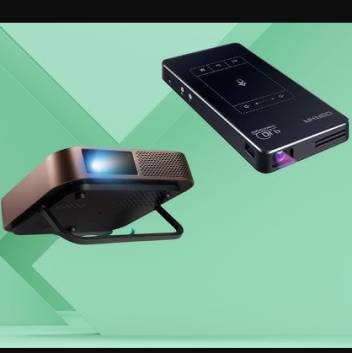
Which Projector Works Best with an iPhone?
The best projector for iPhone depends on your priorities balancing portability, image quality, brightness, connectivity options, and budget—but several standout models consistently earn top rankings across professional reviews and user experiences in 2025. For premium performance with excellent iPhone integration, the XGIMI Halo+ (New) delivers 700 ISO lumens brightness creating vibrant, watchable images even in moderately lit rooms, native 1080p resolution ensuring sharp text and detailed video, built-in Google TV with licensed Netflix eliminating the need to stream from your iPhone for many use cases, dual 5-watt Harman Kardon speakers producing surprisingly rich audio, and seamless wireless screen mirroring supporting AirPlay for effortless iPhone connectivity.
The XGIMI Halo+ excels specifically for iPhone users through its Intelligent Screen Adaptation 5.0 technology automatically detecting and correcting keystone distortion and focus when you move the projector, eliminating the tedious manual adjustments that frustrate users of budget projectors. The wireless AirPlay support works flawlessly—simply ensure both your iPhone and the Halo+ connect to the same WiFi network, open Control Center on your iPhone, tap Screen Mirroring, select “XGIMI Halo+” from the device list, and your iPhone screen appears on the wall within 3-5 seconds. This plug-and-play wireless experience represents the gold standard for iPhone projector connectivity, though the $600-800 price tag reflects premium positioning targeting serious users rather than casual experimenters.
For users seeking best mini projector 4K quality at more accessible pricing, the XGIMI MoGo 4 Laser combines native 1080p resolution with triple RGB laser technology delivering 550 ISO lumens brightness and vivid color accuracy covering 113% of the Rec.709 color gamut. While technically not true native 4K (it uses pixel-shifting technology rather than native 4K resolution), the MoGo 4 Laser supports 4K input and produces noticeably sharper, more detailed images than standard 1080p projectors. The ultra-portable 3-pound design with integrated rechargeable 71Wh battery enables 2-3 hours of cordless operation perfect for outdoor movie nights, camping, or rooms without convenient power outlets. The $400-500 price point positions it as premium-but-accessible for enthusiasts wanting excellent image quality without flagship pricing.
Budget-conscious iPhone users find excellent value in the XGIMI Elfin Flip at approximately $250-300, delivering 400 ISO lumens brightness sufficient for darkened rooms, native 1080p resolution, built-in kickstand enabling tabletop placement without tripod, and comprehensive connectivity including HDMI, USB, WiFi, and Bluetooth. While the lower brightness limits daytime usability and the speakers don’t match premium models’ audio quality, the Elfin Flip provides genuine big-screen entertainment at fraction of flagship projector costs—making it ideal for bedroom use, apartment dwellers prioritizing portability over maximum performance, or first-time projector buyers testing whether they’ll actually use the device before committing to premium investments.
For absolute best mini projector for bedroom applications, consider models specifically optimized for ceiling projection, quiet operation, and comfortable viewing in typical bedroom lighting conditions. The XGIMI MoGo 4 ($300-350) features 360° rotatable built-in stand enabling easy ceiling projection for lying-in-bed viewing, 450 ISO lumens brightness sufficient for dark bedroom environments, whisper-quiet operation that won’t disturb sleep partners, and 71Wh battery providing 2.5 hours of cordless use. The intelligent keystone correction automatically adjusts image geometry even when projecting at extreme upward angles toward ceilings, while the compact 2.5-pound weight means moving it between nightstand and desk takes zero effort.
Are Mini Projectors Compatible with iPhone?
Yes, virtually all modern mini projectors manufactured after 2020 offer iPhone compatibility through one or more connection methods—though the ease, reliability, and quality of that connection varies dramatically between wireless screen mirroring, HDMI adapters, and built-in streaming apps that eliminate the need for phone connection entirely. Understanding these different approaches helps you select projectors offering the connectivity experience matching your preferences and use cases rather than discovering frustrating limitations after purchase.
Wireless screen mirroring via AirPlay represents the most convenient iPhone connection method, working identically to how you’d mirror your iPhone to an Apple TV. Projectors with native AirPlay support (typically those running Android TV, Google TV, or custom operating systems with AirPlay protocols) allow direct wireless connection: ensure both iPhone and projector connect to the same WiFi network, open Control Center on iPhone (swipe down from top-right on iPhone X and later, swipe up from bottom on older models), tap Screen Mirroring, select your projector from the available device list, and your iPhone screen appears on the projected image within seconds. This wireless approach enables walking around while presenting, controlling content from across the room, and avoiding cable tangles—though it requires stable WiFi networks and may experience occasional lag or quality reduction compared to wired connections.youtube
HDMI connection via Lightning/USB-C adapter provides the most reliable, highest-quality iPhone-to-projector connection by bypassing wireless compression and network reliability issues. For iPhone 14 and earlier with Lightning ports, you’ll need Apple’s Lightning Digital AV Adapter ($49) or third-party equivalents ($15-30) featuring Lightning connector for iPhone, HDMI output for projector, and often additional Lightning pass-through port for charging iPhone during use. For iPhone 15 and later with USB-C ports, use USB-C to HDMI adapters or cables ($10-25) connecting directly from iPhone to projector’s HDMI input. This wired approach delivers zero-lag mirroring, full resolution without wireless compression artifacts, and guaranteed connection stability regardless of WiFi conditions—though the cable tethering limits mobility and adds clutter.
Built-in smart features on projectors running Google TV, Android TV, or proprietary operating systems often eliminate the need for iPhone connection by providing native apps for Netflix, YouTube, Disney+, Prime Video, and other streaming services. You can browse, select, and play content directly on the projector using its remote control, keeping your iPhone free for other tasks or conserving battery. However, this approach doesn’t help for content stored locally on your iPhone, photos/videos from your Camera Roll, presentations, or apps without smart TV equivalents—situations where screen mirroring remains necessary.
Bluetooth audio pairing represents a supplementary connection method where projectors with Bluetooth output can connect to external Bluetooth speakers or headphones for improved audio quality or private listening. This doesn’t replace video connection methods but enhances the audio experience when projector’s built-in speakers prove inadequate. The mini projector for iPhone Bluetooth search term often confuses users expecting Bluetooth to handle video transmission—current Bluetooth standards don’t support video streaming bandwidth requirements, so Bluetooth on projectors strictly manages audio connections.
The critical compatibility consideration involves verifying specific connection protocols supported by prospective projectors before purchasing. Product descriptions should explicitly state “AirPlay support,” “iOS compatibility,” “iPhone screen mirroring,” or similar language—vague claims about “wireless connection” or “smartphone compatible” without specifying iOS support may indicate Android-only compatibility using protocols like Miracast that iPhones don’t support. When uncertain, check user reviews specifically mentioning iPhone connectivity or contact manufacturers directly to confirm iOS compatibility before committing to purchases.
Can I Project My iPhone to a Projector?
Absolutely—projecting your iPhone to a projector works through multiple proven methods offering varying levels of convenience, quality, and reliability. The optimal approach depends on your projector’s capabilities, your willingness to purchase adapters, and your specific use case requiring wireless mobility versus maximum image quality.
The wireless AirPlay method (detailed earlier) provides the most convenient iPhone projection when your projector supports it: both devices connect to the same WiFi network, you select Screen Mirroring from iPhone’s Control Center, choose your projector from the device list, and projection begins automatically. This approach works perfectly for casual viewing, photo sharing, presentations where you’ll move around the room, and situations where cable clutter proves unacceptable. The minor lag (typically 50-150 milliseconds) remains imperceptible for most content but may affect fast-paced gaming where timing matters—competitive gamers should use wired connections for zero-latency projection.
The wired HDMI adapter method requires purchasing Apple’s official Lightning Digital AV Adapter ($49) or USB-C to HDMI adapter ($10-25 for iPhone 15+), plus an HDMI cable connecting adapter to projector. This setup delivers the highest possible image quality by eliminating wireless compression, ensures zero lag for gaming, works regardless of WiFi availability, and provides the most reliable connection immune to wireless interference—ideal for important presentations where connectivity failures would prove embarrassing or gaming sessions where lag affects performance. The downsides include cable management hassles, limited mobility while tethered to projector, and the adapter cost that budget-conscious users may resent.
The screen mirroring app method applies to projectors running Android operating systems with dedicated screen-sharing apps like “EZCast,” “AirScreen,” “Miracast,” or proprietary manufacturer apps. These apps create WiFi Direct connections between iPhone and projector without requiring separate WiFi networks—the projector essentially becomes a WiFi hotspot your iPhone connects to specifically for screen mirroring. The setup process varies by projector but generally involves: installing the screen mirroring app on the projector (usually pre-installed or available through projector’s app store), launching the app and noting the projector’s name/code, opening Control Center on iPhone and selecting Screen Mirroring, and choosing the projector from available devices. This method works in locations without WiFi (hotel rooms, outdoor areas, etc.) but may prove less stable than AirPlay on proper WiFi networks.
Troubleshooting common projection issues helps when connections fail: ensure both iPhone and projector connect to identical WiFi network names (not separate 2.4GHz and 5GHz networks from the same router), restart both devices to clear temporary glitches, disable VPNs on iPhone which can block local network discovery, verify projector software is updated to latest firmware version addressing known bugs, and confirm no other devices are already screen mirroring to the projector creating connection conflicts. The vast majority of iPhone-to-projector connectivity problems stem from WiFi network mismatches or outdated projector firmware rather than fundamental incompatibility.
For projectors completely lacking wireless capabilities or iOS compatibility, the Lightning/USB-C to HDMI adapter remains the universal solution working with any projector featuring HDMI input—which encompasses 99% of projectors manufactured after 2010. This hardware-based approach bypasses all software compatibility concerns, making it the foolproof option for users unable or unwilling to troubleshoot wireless connectivity issues.
Does Apple Make a Mini Projector?
No, Apple does not manufacture a mini projector or any projector product as of 2025. While Apple’s ecosystem includes displays (Studio Display, Pro Display XDR), streaming devices (Apple TV), and various screens across iPhone, iPad, and Mac product lines, the company has never entered the projector market despite persistent rumors and concept designs circulating online periodically. This absence likely reflects Apple’s strategic focus on direct-view display technologies including OLED, Mini-LED, and MicroLED rather than projection systems, combined with the relatively niche projector market compared to the hundreds-of-millions-unit scale of Apple’s display-equipped products.
However, Apple’s influence permeates the mini projector market through AirPlay protocol licensing that enables third-party manufacturers to build iOS-compatible projectors offering seamless iPhone integration. Projectors from XGIMI, Anker Nebula, BenQ, Epson, and dozens of other manufacturers implement AirPlay support allowing them to appear as native screen mirroring destinations in iPhone’s Control Center—delivering integration nearly as seamless as if Apple manufactured the projectors themselves. This approach lets Apple maintain ecosystem stickiness (projector purchases strengthen reasons to stay within iPhone ecosystem) without directly competing in the projector hardware business.
The Apple TV serves as Apple’s closest official projection-related product, functioning as an HDMI bridge between iPhones and projectors. By connecting an Apple TV 4K ($129-149) to any projector’s HDMI input, you gain native AirPlay support, access to all tvOS apps including Apple TV+, iTunes purchases, Apple Fitness+, and Photos, and superior integration with iPhone compared to most projectors’ built-in AirPlay implementations. For users with projectors lacking native AirPlay or running outdated systems with buggy iOS connectivity, the Apple TV represents worthwhile $129 investment transforming any dumb projector into smart, iPhone-optimized device—though it adds complexity and cost compared to projectors with excellent native AirPlay support.
The absence of an Apple projector means iPhone users must navigate third-party projector market without the comfort of official Apple quality guarantees, warranty support through Apple Stores, or the polished industrial design expected from Apple products. However, this also means avoiding Apple’s traditional pricing premiums—a hypothetical Apple mini projector would likely cost 2-3x more than equivalent third-party options while offering marginally better integration and aesthetics that may not justify the markup for most users.
Best Mini Projector for iPhone Under $100
The best mini projector for iPhone under $100 category requires managing expectations carefully—projectors at this price point make significant compromises in brightness, resolution, build quality, and features compared to $300+ premium models, but can still deliver satisfying experiences when used appropriately in dark rooms for casual viewing. The key involves understanding limitations and selecting budget projectors offering the best balance of usability versus merely hitting ultra-low price points through severe corner-cutting.
The VANKYO Leisure 470 series frequently appears in under-$100 recommendations, typically priced $70-90 and offering 720p native resolution (1080p support means accepting 1080p input then downscaling to native 720p), built-in WiFi enabling wireless screen mirroring from iPhone, Bluetooth audio output for connecting external speakers, 3500 lumens claimed brightness (though real-world performance closer to 150-200 ANSI lumens due to misleading marketing metrics), and included carrying case. The Leisure 470 delivers watchable images in darkened rooms for movie nights, though the relatively low brightness and 720p resolution mean daytime viewing proves challenging and fine text appears somewhat blurry.
The ARTSEA Mini Projector ($60-90 on sale) provides similar specifications including 1080p support (native 480p-720p depending on specific model), WiFi and Bluetooth connectivity, HDMI/USB inputs, built-in speaker, and compatibility with iOS, Android, Windows, and streaming sticks. User reviews reveal mixed experiences—some buyers report satisfactory performance for bedroom viewing and kids’ entertainment, while others complain about connectivity issues, fan noise, and image quality falling short of expectations set by deceptive marketing photos showing vibrant, sharp images that real-world performance doesn’t match.
The harsh reality of sub-$100 projectors involves systematic specification inflation where manufacturers claim brightness levels 10-20x higher than actual output (stating “9000 lumens” for projectors producing 150-200 ANSI lumens), tout “4K support” meaning merely accepting 4K input before downscaling to native 480p-720p resolution, and use promotional photos showing images far brighter and sharper than actual products deliver. Savvy buyers should halve or quarter all claimed specifications and read recent user reviews specifically mentioning actual brightness, true native resolution, and real-world iPhone connectivity experiences rather than trusting marketing descriptions.
For users determined to stay under $100, the best approach involves treating budget projectors as experimental purchases or secondary devices for non-critical applications rather than primary home entertainment systems. They work adequately for kids’ rooms where image quality matters less than novelty of wall-projected cartoons, camping where any projection beats phone screens, presentations in dark conference rooms, and casual backyard movie nights where darkening eliminates brightness limitations. Anyone expecting bright, sharp, reliable images comparable to TVs or premium projectors will face inevitable disappointment at this price tier.
Alternative budget strategies that often deliver better value include: purchasing older previous-generation projectors from reputable brands like BenQ, Epson, or Optoma at clearance prices in the $150-200 range (often vastly superior to new generic $70-100 projectors), considering refurbished units from authorized sellers offering 90-day warranties, or saving to reach $200-300 tier where projector quality jumps dramatically—the difference between $80 generic projectors and $250 brand-name models far exceeds the $170 price gap in terms of actual usability and satisfaction.
Top Mini Projector Recommendations for iPhone Users
Best Overall Premium: XGIMI Halo+ (New) – $600-800
The premium choice for users wanting exceptional image quality, brightness, and iPhone integration. The 700 ISO lumens brightness enables viewing in moderately lit rooms rather than requiring complete darkness, the 1080p native resolution delivers crisp text and detailed video, the Harman Kardon dual speakers produce room-filling audio eliminating need for external speakers in most situations, and the Google TV interface provides access to streaming apps independent of iPhone. The Intelligent Screen Adaptation 5.0 automatically corrects focus and keystone distortion when moving the projector, while seamless AirPlay support makes iPhone connectivity effortless. The $600-800 price positions this as serious investment for home theater enthusiasts, remote workers needing portable presentation capability, or anyone valuing premium performance enough to justify the cost.
Ideal for: Home theater enthusiasts, professionals needing presentation-quality images, users wanting TV-replacement quality in portable package.
Best Premium Portable: XGIMI MoGo 4 Laser – $400-500
The sweet spot for users wanting excellent image quality in ultra-portable package. The triple RGB laser technology delivers 550 ISO lumens with vibrant color covering 113% Rec.709, native 1080p resolution with 4K input support, and 71Wh battery providing 2-3 hours cordless operation. Weighs just 3 pounds enabling easy transport for outdoor movies, hotel rooms, or moving between rooms. The MoGo 4 Laser represents the minimum entry point into truly satisfying projector performance while maintaining genuine portability.
Ideal for: Frequent travelers, outdoor movie enthusiasts, apartment dwellers wanting quality projection without flagship pricing.
Best Mid-Range Value: XGIMI Elfin Flip – $250-300
Budget-friendly option that doesn’t sacrifice too much performance. The 400 ISO lumens brightness works well in dark rooms, native 1080p resolution handles text and video admirably, built-in kickstand eliminates tripod requirements, and comprehensive connectivity (WiFi, Bluetooth, HDMI, USB) accommodates various use cases. While brightness limits daytime use and speakers prove adequate rather than impressive, the Elfin Flip delivers legitimate big-screen entertainment at accessible pricing perfect for first-time projector buyers or bedroom secondary systems.
Ideal for: Bedroom use, budget-conscious buyers, first-time projector owners testing whether they’ll use it regularly.
Best True Budget: XGIMI MoGo 4 – $300-350
The most affordable option from a reputable premium brand. Features 450 ISO lumens, 1080p resolution, 71Wh battery, 360° rotatable stand for ceiling projection, and automatic keystone correction. Represents significant step down from MoGo 4 Laser in brightness and color accuracy, but maintains solid build quality and reliable iPhone connectivity that generic budget projectors can’t match. The battery enables cordless operation distinguishing it from AC-only budget competitors.
Ideal for: Bedroom ceiling projection, budget-conscious buyers wanting brand reliability, users needing battery operation.
Best Ultra-Budget (Under $100): VANKYO Leisure 470 – $70-90
For users absolutely committed to sub-$100 pricing. Offers 720p native resolution, WiFi screen mirroring, Bluetooth audio, and basic projection capability sufficient for dark-room viewing. Requires managing expectations about brightness, image quality, and longevity—this won’t replace TVs or satisfy videophiles, but works adequately for kids’ rooms, camping, or experimental first projector purchases.
Ideal for: Experimental purchases, kids’ rooms, camping/outdoor use, users testing projector concept before premium investment.
Critical Specifications Explained
Brightness (Lumens) determines usability in various lighting conditions. Look for ISO lumens, ANSI lumens, or lux specifications rather than generic “lumens” claims that often inflate by 10-20x. For dark rooms, 300-500 ISO lumens suffices; for rooms with ambient light, aim for 600+ ISO lumens; for daytime viewing, 1000+ ISO lumens proves necessary. Budget projectors claiming “9000 lumens” typically deliver 150-200 ANSI lumens actual brightness—ignore marketing numbers and trust professional reviews stating real measurements.
Resolution matters more for text and UI elements than video content. Native 1080p (1920×1080) provides sharp, readable text for presentations and clear video detail. “4K support” on budget projectors typically means accepting 4K input then downscaling to native 720p-1080p—this isn’t true 4K projection. Native 720p (1280×720) works for casual video but text appears slightly blurry. Avoid native 480p projectors regardless of “1080p support” claims unless absolutely constrained by sub-$70 budgets.i
Connectivity options should include WiFi (802.11ac or WiFi 6), HDMI input, USB port, and ideally native AirPlay support for iPhone. Built-in streaming apps (Google TV, Android TV, Netflix, YouTube) add convenience by eliminating need to stream from phone for common content. Bluetooth audio output enables connecting external speakers for improved sound. Avoid projectors offering only proprietary wireless protocols without confirming iOS compatibility.
Battery versus AC power trades portability for brightness. Battery-powered projectors enable outdoor use, hotel rooms, areas without convenient outlets, and bedroom ceiling projection without trailing power cables—but typically sacrifice brightness (most battery models produce 400-600 lumens versus 700-1000+ for AC models). Consider your primary use case: predominantly outdoor/portable use favors battery; mostly home use favors AC-powered brightness.global.xgimi
Keystone correction and autofocus dramatically affect user-friendliness. Automatic correction eliminates tedious manual adjustment when projecting at angles or after moving projector—you simply place it and image auto-corrects within seconds. Manual-only correction requires fiddling with remote controls to fix trapezoid distortion and focus blur, frustrating process that degrades satisfaction with otherwise decent projectors. Prioritize automatic correction in your budget tier.
iPhone Connection Methods Compared
| Method | Quality | Convenience | Cost | Requirements | Best For |
|---|---|---|---|---|---|
| Wireless AirPlay | Good (minor compression) | Excellent (tap and go) | $0 | WiFi network, AirPlay-compatible projector | Casual viewing, presentations, photo sharing |
| HDMI Adapter (Wired) | Excellent (no compression) | Moderate (cable tethering) | $10-49 | Lightning/USB-C to HDMI adapter, HDMI cable | Gaming, critical presentations, maximum quality |
| Screen Mirroring Apps | Good to Fair | Moderate (app setup required) | $0 | Compatible projector with app | Areas without WiFi, budget projectors |
| Apple TV Bridge | Excellent | Excellent | $129-149 | Apple TV 4K, HDMI cable | Projectors lacking native AirPlay, premium integration |
Frequently Asked Questions
Can I play Netflix from iPhone to projector?
Yes, through screen mirroring or HDMI adapter. However, some streaming apps block screen mirroring due to DRM restrictions—in these cases, use HDMI adapter or the projector’s built-in Netflix app if available.
Will iPhone charging work during projection?
With HDMI adapters featuring Lightning/USB-C pass-through ports, yes. Wireless mirroring drains battery faster than normal use, so keeping iPhone plugged in during extended viewing sessions proves advisable.
Do I need internet to project iPhone to projector?
For wireless AirPlay, you need a WiFi network (internet connection not required—just local network). For HDMI adapter, no network needed. For streaming content, internet obviously required regardless of connection method.
Can I use projector with iPhone and Android?
Most modern projectors support both iOS (AirPlay) and Android (Miracast/Chromecast), though verify specific compatibility before purchasing. HDMI adapters work universally with appropriate cables for each device type.
How bright does bedroom projector need to be?
For dark bedrooms, 300-500 lumens suffices. For rooms with some ambient light (nightlight, hallway light), aim for 500-700+ lumens for comfortable viewing.
What size image can mini projectors create?
Most mini projectors produce images from 40-200 inches diagonal depending on throw distance (distance between projector and wall). Typical bedroom setup at 6-10 feet produces 60-100 inch images—far larger than affordable TVs.
Making Your Final Decision
Choosing the best mini projector for iPhone requires balancing your budget, primary use case, portability needs, and image quality expectations. Users willing to invest $400-800 should seriously consider premium options like XGIMI Halo+ or MoGo 4 Laser delivering image quality approaching TV-level performance with brightness enabling moderate ambient light viewing—these represent genuine home entertainment upgrades rather than mere novelties. The superior build quality, reliable connectivity, and satisfying image quality of premium projectors justify higher costs through years of regular use and genuine enjoyment rather than disappointment with barely-usable cheap alternatives.
Mid-budget buyers in the $200-350 range find excellent value in models like XGIMI Elfin Flip or MoGo 4 offering solid 1080p performance, reliable iPhone connectivity, and respectable brightness for dark-room viewing—these represent the minimum entry point into truly satisfying projector ownership balancing acceptable performance with reasonable pricing. This tier suits buyers confident they’ll use projectors regularly but hesitant to commit flagship pricing until proving sustained usage justifies premium features.
Budget-constrained buyers under $100 should carefully consider whether projectors genuinely suit their needs or whether saving toward the $200-300 tier produces better outcomes through usable rather than disappointing performance. If sub-$100 represents absolute limit, recognize you’re purchasing experimental device for specific use cases (kids’ rooms, camping, temporary solutions) rather than quality home entertainment system—and accept that many buyers in this tier ultimately regret not spending $150-200 more for dramatically better experiences.
The mini projector market in 2025 offers genuine innovation and value, particularly for iPhone users benefiting from seamless AirPlay integration across premium and mid-range models. Whether you’re creating magical bedroom movie theaters, hosting backyard cinema nights, traveling with portable entertainment, or simply wanting bigger screens than TVs provide, the right mini projector transforms your iPhone into remarkably versatile big-screen source—provided you select models matching your realistic needs and budget rather than falling for too-good-to-be-true marketing claims from bottom-barrel products.

Editor-in-chief in charge of reviewing an article before it is published on applerepo.com