
Magnetic Pop Socket for iPhone: The Ultimate Guide to MagSafe Grips
We have all experienced that heart-stopping moment when a brand-new iPhone slips from our fingers, tumbling in slow motion toward the concrete. Or perhaps you are familiar with the “pinky dent”—the uncomfortable ache in your finger after propping up your heavy device for hours of scrolling. For years, the solution was the trusty adhesive PopSocket. But in 2026, gluing a piece of plastic to your expensive device feels archaic.
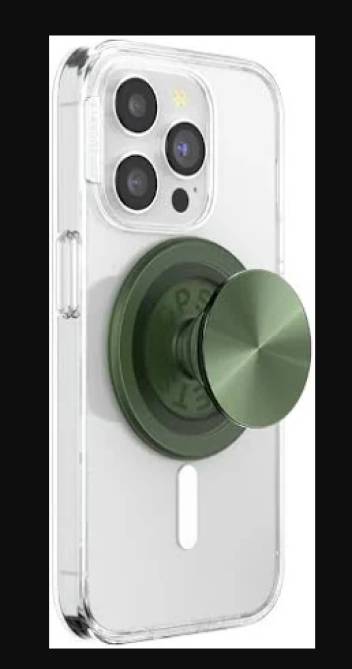
Enter the magnetic pop socket for iPhone. This accessory has revolutionized how we hold our devices, leveraging Apple’s MagSafe technology to offer the perfect blend of security and flexibility. If you are still using a sticky grip, it is time for an upgrade. In this guide, we will explore everything you need to know about magnetic grips, from safety and compatibility to the best options on the market.
What is a Magnetic Pop Socket and How Does it Work?
At its core, a magnetic pop socket—often referred to officially as a “PopGrip for MagSafe”—is a removable grip that attaches to your iPhone using magnets rather than adhesive.
When Apple introduced the iPhone 12, they embedded a ring of magnets into the back of the device, a feature known as MagSafe. A magnetic pop socket features a corresponding array of powerful magnets built into its base. When you bring the grip close to the phone, it snaps perfectly into alignment with a satisfying click.
This technology answers the common question: Are there MagSafe PopSockets? Yes, absolutely. In fact, they have largely replaced adhesive versions for iPhone users because they solve the biggest problem of the original design: permanence. With a magnetic grip, you get the security of a handle when you need it and a sleek, bare phone when you don’t.
Key Benefits of Switching to a Magnetic Pop Socket
Why should you ditch your old adhesive grip for a magnetic one? The advantages go far beyond just looking cool.
Seamless Wireless Charging
The single biggest advantage is charging. Can I use a magnetic popsocket on my iPhone while charging? Not exactly, but that is the best part. With old PopSockets, wireless charging was impossible because the plastic base blocked the signal. With a magnetic pop socket, you simply slide the grip off, place your phone on the charger, and snap it back on when you’re done. It takes less than a second.
Zero Residue and Damage
We have all struggled to scrape old adhesive off a phone case, leaving behind a sticky, ugly mess. Magnetic grips use zero glue. You can take them on and off a thousand times, and your iPhone case will look exactly as pristine as the day you bought it. This is especially valuable if you use high-end leather or silicone cases.
Ultimate Customization
Magnetic bases allow you to swap accessories on the fly. Going for a night out? Swap your magnetic pop socket for iPhone with a MagSafe wallet. Need extra power? Swap it for a MagSafe battery pack. You are no longer “married” to one accessory permanently stuck to your phone.
Compatibility Guide: Can I Use a Magnetic PopSocket on My iPhone?
Understanding compatibility is crucial to ensure your grip holds securely. Not all iPhones and cases are created equal.
Native iPhone Compatibility
If you have an iPhone 12, 13, 14, 15, 16, or the latest iPhone 17 series, your phone has built-in MagSafe magnets. You can snap a magnetic pop socket directly onto the naked phone (though using a case is recommended for better grip friction).
Can You Put a Pop Socket on a Magnetic Phone Case?
Yes, and this is actually the preferred method. Can you put a pop socket on a magnetic phone case? Absolutely. In fact, a high-quality MagSafe-compatible case often provides a stronger hold than the bare phone because the case’s surface texture creates more friction, preventing the grip from sliding.
Warning: Do not try to use a magnetic grip with a standard, non-MagSafe case. The magnets will not be strong enough to hold through the thickness of standard plastic or rubber, and your phone will likely fall. Always look for the white circle symbol inside the case or the “MagSafe Compatible” label on the box.
For Older iPhones and Androids
If you have an older iPhone (like the iPhone 11 or XR) or an Android device, you aren’t left out. You can purchase “MagSafe Adapter Rings”—thin metal rings with adhesive backing. By sticking one of these rings to the back of your phone case, you effectively retroactively add MagSafe compatibility, allowing you to use any magnetic pop socket for iPhone.
Safety Concerns: Is it Okay to Put a Magnet on the Back of an iPhone?
A common fear among new users is whether magnets might harm their sophisticated device. Is it okay to put a magnet on the back of an iPhone?
The short answer is yes. Apple specifically designed modern iPhones to live in a magnetic ecosystem. The internal components, including the storage drive and battery, are shielded from magnetic interference. The magnets used in these accessories are strong enough to hold the phone but not powerful enough to scramble data or damage electronics.
However, a small note of caution regarding credit cards: While the phone is safe, strong magnets can demagnetize older magnetic-stripe credit cards. Most modern MagSafe wallets are shielded to prevent this, but it is best not to store loose credit cards in your pocket directly next to a strong magnetic grip.
Top Recommendations for Magnetic Pop Sockets in 2026
If you are ready to buy, here are the top contenders dominating the market this year.
1. The Official PopSockets PopGrip for MagSafe
The original brand remains the gold standard. Their magnets are reportedly 40-50% stronger than standard Apple guidelines, ensuring your phone never flies off. They offer thousands of designs, and the “PopTop” is swappable.
2. Anker 610 Magnetic Phone Grip (MagGo)
If you prefer a ring style over a knob, Anker is a fantastic choice. It is slimmer than a PopSocket and feels incredibly premium with its metal construction. The magnet strength is legendary—often strong enough to lift the phone entirely by the ring.
3. Custom Magnetic Pop Socket Options
For those who want something unique, you can find a custom magnetic pop socket for iphone. Many third-party sellers on Etsy or specialized tech sites allow you to print your own photos, logos, or art onto the magnetic base. This is a great way to personalize your device without permanently altering a case.
Installation and Maintenance Tips
To get the best performance out of your new gear, follow these simple tips:
-
Slide, Don’t Pull: When removing the grip, slide it off the side of the phone rather than pulling it straight off. This breaks the magnetic bond more easily and puts less stress on the materials.
-
Keep it Clean: Magnetic connection relies on flush contact. Periodically wipe the back of your case and the magnetic ring of the pop socket to remove dust or grit, which can reduce grip strength.
-
Test the Shake: Before trusting a new case with your magnetic grip, do a “shake test” over a soft surface (like a bed/couch) to ensure the magnet strength is sufficient for daily use.
The evolution from sticky adhesive to magnetic attachment has made phone grips more useful than ever. A magnetic pop socket for iPhone offers the security you need to text one-handed or take stable selfies, with the flexibility to remove it instantly for wireless charging. With robust safety features and broad compatibility across cases, there is no reason to stick with the old ways. Upgrade your grip, protect your phone, and enjoy the click.

Editor-in-chief in charge of reviewing an article before it is published on applerepo.com