
Steps to Get Free iPod Touch Apps on Itunes Without Credit Card
Steps to Get Free iPod Touch Apps on Itunes Without Credit Card
New Update report from user Jayant Sharma: He has tried that using itunes 10 won’t work, Only could work with iTunes 9. Check next paragraph to read his steps:
Create iTunes Account Without Credit Card to get Free iPod Touch Apps – tips from Jayant Sharma
i can tell u all to download free apps……..
NOTE:- This works only in ITUNES 9…..
THIS REALLY WORKS!!!!! THOSE WHO DONT BELIEVE ME TRY IT!!!!1. Download Itunes 9 (it doesnt work in 10 or any other).
2. Open it and then open Itunes store.
3. click on Sign In.
4. Then Click on create an account.
5. click on continue.
6. Fill the information correct (not fake)and fill ur gmail id.
7. click continue.
8. click on i agree the terms and conditions.
9.In credit card option click on none (none option is available in itunes 9 only).
10.Fill ur adress and phone no. correct.
11.click ok.
12.Go to ur gmail account, there will be a message sent by Apple.
13.Click on that message and click on the link given below.
14.This will confirm ur Id on Itunes Store.
15.Now go 2 Itunes store and Sign In.
16.Click on Search and find any free app. Some interesting apps are Talking Tom Cat,Angry Birds,Coin dozer etc.
17. Now click on FREE written under that app. and ur download will start. You Should download only free apps.
18.Put The Apps in Ur Iphone Or Ipad……….
Enjoy……………………………………………
THIS WORKS REALLY…..!!!!!
UPDATE:Here is the share from Victoria to get Free iTunes Account without credit card with “NONE” button.
“hey,
i had the same problem a lot of people are saying, where you cant see the “none” button. but i got mine to work finally!
this is what you do:
make a new email the you can use as your apple ID
go to itunes ( do it from your computer, it might not work from your ipod/iphone) and go to app store.
go to any free app (remote works) and try to download it. when that thing pops up press new account, and use the new email/fill out the rest.
when it goes to the billing page, you should see the none button!
it worked for me this way, so i hope it works for you guys!
hope i helped,
goodluck
Victoria
After so many people asking about how to get the free ipod touch apps from itunes, today I am going to share you the steps on how to do that. You no need any WiFi to do This. You need your iPhone or iPod Touch, Usb cable to connect your phone to computer. The latest iTunes 9.0.1.8 already installed in your computer / PC / Notebook.
Please follow these steps to get free iPod Touch Apps from iTunes: (You could read the Steps on how to create an iTunes Account without credit card in the Official Apple.com help site Here)
Update 27 December 2009: Many people have been reported that they don’t see the “NONE” option like the steps below. Might be this problem occur because the iTunes store not set up to US iTunes Store. These steps tested on US iTunes Store. So before you follow the steps below, please set your itunes store to US. To do that go to the very bottom of the iTunes Store page and select US from there. See the screen shots below:
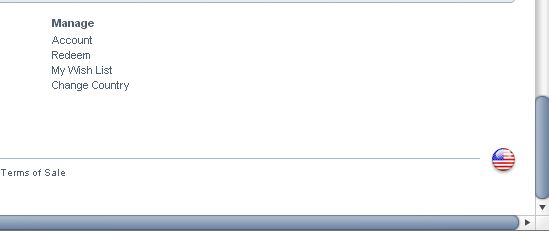
Click the Flag to Choose the store (my iTunes has been set up to Us, so the Flag is US Flag).
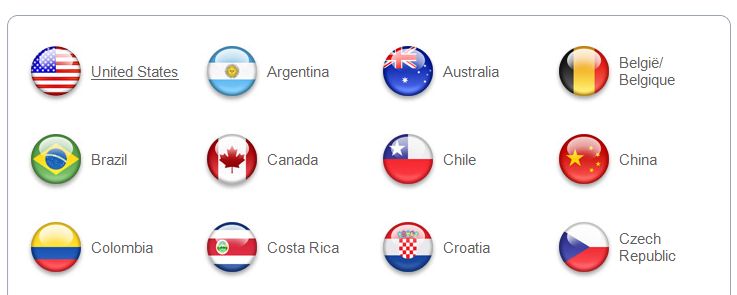
Choose US Flag from the Choice above.
Then follow the Steps Below. I hope now all people could see the “NONE” option.
1. Please connect your iPod Touch or iPhone using USB cable to your computer.
2. iTunes which already installed in your PC should be pop out automatically, if not, then please open the itunes manually. This process is called iPod Touch Syncing.
3. Go to iTunes page, and please choose >> iTunes Stores.
4. In the Top right Page you will found a Search Box there. Just Type: Free Apps
And Click Enter.
5. You will see many choice of apps there, some are paid iPod Touch Apps, but many of them are Free. Just choose the Free Apps.
6. Click the Free Apps that you want and you will delivered to the individual page of that app. Scroll down the page and see at The Bottom Right, see the Requirement there. You will get the info what is the minimum requirement of your iPod Touch and iPhone OS.
7. If All Okay, Click the “Get App”. And the new window will be pop up. You will asking to enter your Apple Id to sign in Itunes. if you do not have yet, then Choose the “Create New Account” button there. And follow all the instruction to create itunes account there.
Big Note 1: For now, Only US people with US Address who could create the account.
Big Note 2: When creating new account, Itunes will asking you to enter payment option, like Credit Card or Paypal. Bur there is one best Option if you do not have any credit card or paypal, the Option is “NONE”. If you choose “NONE” option for payment, then you only could download Free iPhone Apps.
For you that mis the word: NONE, please see the screen shot image below, the word is placed at the right of the credit card and other payment processors:
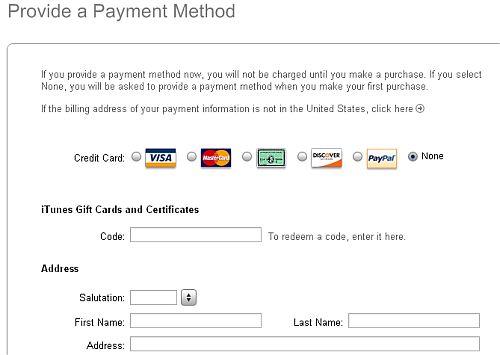
8. After you get the account details and you could sign in to the iTunes Stores, then the free Apps will be downloaded automatically to your iPhone and iPod Touch.
9. Last step is go to your iPod Touch and iPhone and check your free iPod touch App that you want.
There are thousands Free ipod Touch Apps in Itunes Stores, just pick the app and follow all steps above to get the apps. Please read the review about Popular ipod Touch/iPhone Apps and iPhone Games Apps in following sites:
1. TouchGeek.Com
2. TopiTouchGames.Com
3. TopiTouchApps.Com
4. iPodPortal.Com
Best Free iTunes / Iphone Offers:

Please note that this method to create free itunes account without credit card is work for most people especially from USA, German, Spanish, and many other big countries, And if you found that you could not use the method and do not see the “NONE” button, might be iTunes do not allow your country to create Free itunes account without entering Credit card details.
And if You have another Tips and more simply steps to get free ipod touch apps, Please kindly share it to us by dropping a comment below
A father who likes to write about Smartphones, gadgets and technology